A best friend quiz is a simple way to turn friendships into something fun and interactive. It helps people test how well they know each other, start conversations, and share results that feel personal. That’s why these quizzes work so well for friend groups, school activities, events, and even personal websites.
A best friend quiz can be done offline with printed questions or online so friends can play and share results easily. With WordPress, tools like Quiz and Survey Master (QSM) make it easy to handle questions, answers, scores, and results without technical effort.
This blog explains how to create a best friend quiz from start to finish, covering questions, answers, scoring, and results in a clear and simple way.
Table of Contents
Why Best Friend Quizzes Are So Popular
To create a best friend quiz on WordPress, you need a quiz tool that can manage questions, answers, scoring, and results in one place. Quiz and Survey Master (QSM) helps you do this inside your WordPress site.
After adding QSM, you can build the full quiz flow. This includes writing questions, setting correct answers, collecting names, showing results, and sending emails. Once the setup is ready, the main focus is to make sure the quiz feels easy and enjoyable for anyone who plays it.
How to Create a Best Friend Quiz in WordPress?
To create a best friend quiz on WordPress, you need a quiz tool that can manage questions, answers, scoring, and results in one place. Quiz and Survey Master (QSM) helps you do this inside your WordPress site.
After adding QSM, you can build the full quiz flow. This includes writing questions, setting correct answers, collecting names, showing results, and sending emails. Once the setup is ready, the main focus is to make sure the quiz feels easy and enjoyable for anyone who plays it.
For a detailed guide, read How to Create a WordPress Quiz: 3 Easy Steps (No Coding)
Step 1: Add Fun and Personal Best Friend Quiz Questions
Start with bff quiz questions that reflect real friendship. Good questions usually come from daily life, things your friend sees you do, hears you talk about, or remembers from shared moments.
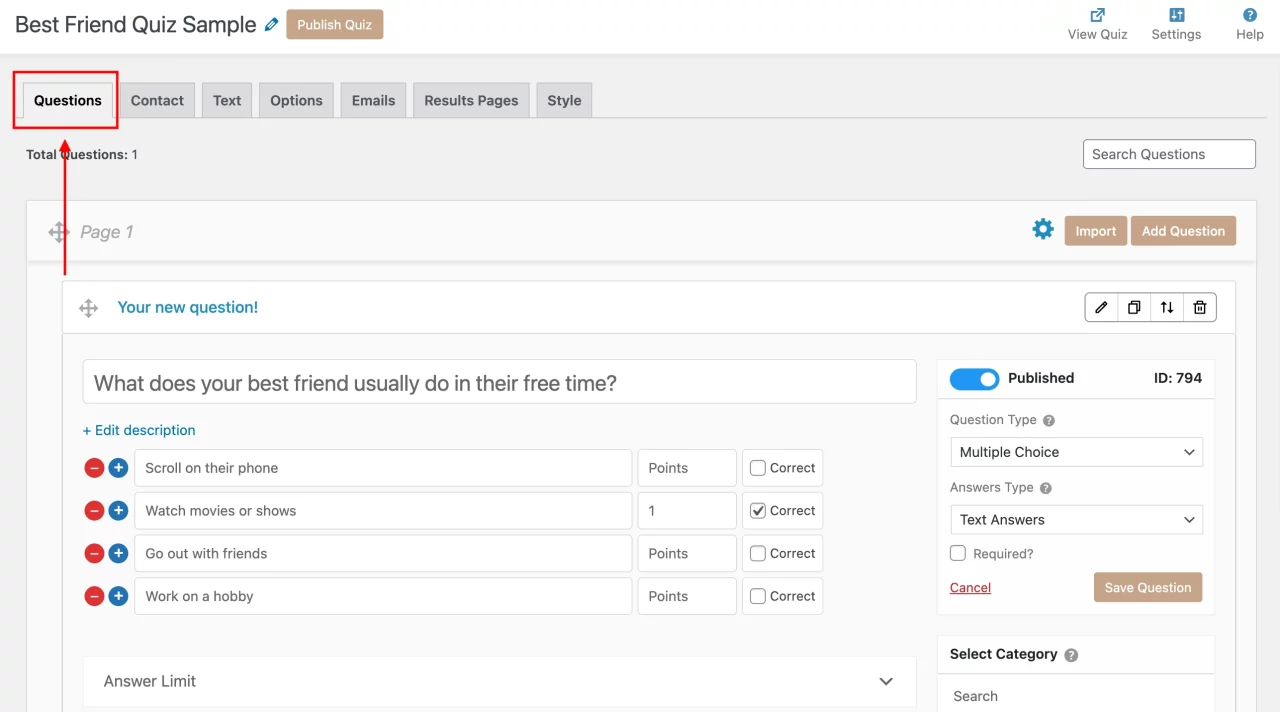
Try not to rely only on obvious questions like favorite color or food. Mix them with questions about habits, preferences, or small choices. These make the quiz feel more thoughtful.
Keep the number of questions balanced. Around 8 to 15 questions works well. Fewer than that feels too short, and too many can make users leave before finishing.
Step 2: Add Answer Options and Set Correct Answers
Each question should have clear answer choices. QSM offers 18 question types to customize your quiz like multiple choice, date, dropdown, fill-in-the-blank and more. Short options work better, especially on phones. Avoid long sentences in answers, as they slow users down.
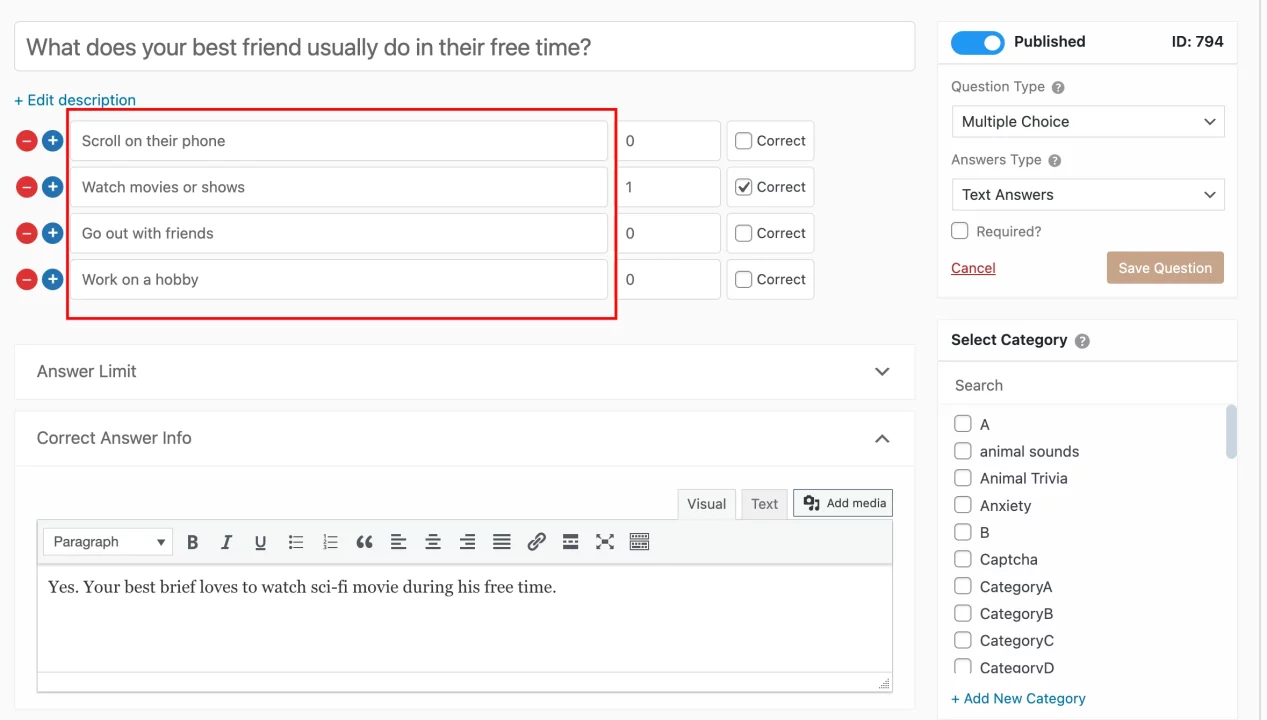
When setting the correct answer, think from your point of view. The quiz works best when answers are clearly right or wrong, not confusing or debatable. This helps the scoring feel fair. This step is important because the quality of answers directly affects how accurate and believable the final result feels.
Step 3: Create a Contact Form to Capture Names and Emails
Before showing results, add a simple contact form. This helps personalize the quiz and also lets you know who played it.
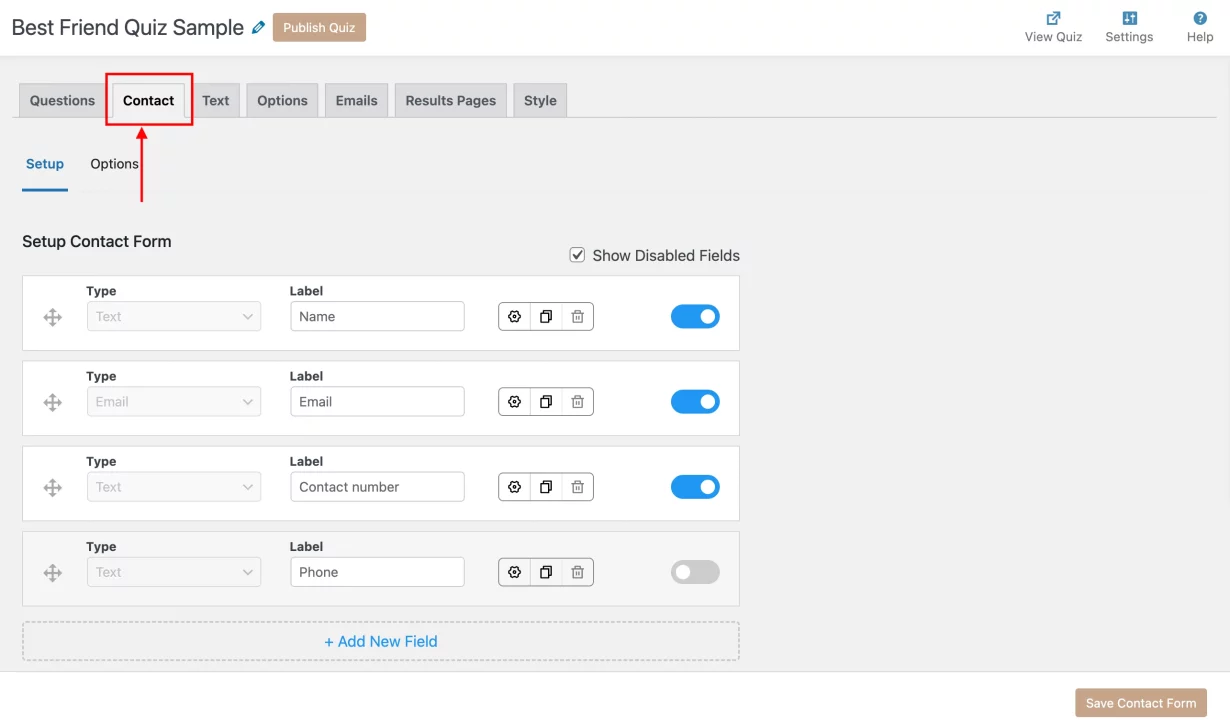
Keep the form short. Asking for a name and email is usually enough. The goal is not to collect data but to make results feel personal, like “Hey Alex, here’s how you did.” Placing the form just before the results page works best, because users are already curious and more likely to complete it.
Step 4: Add Custom Quiz Texts and Button Labels
Small texts shape how users feel while playing. A short intro at the start helps set expectations and mood. It can be friendly, light, or playful, depending on your style. Button labels should be clear and simple, like “Next Question” or “Show My Score.”

Avoid confusing words or long phrases. You can also add short helper lines between questions to keep users relaxed and engaged, especially if the quiz is slightly longer.
Step 5: Customize Quiz Settings for Better User Experience
Quiz settings control the flow. Showing one question per page often feels cleaner and less overwhelming. It also keeps users focused.
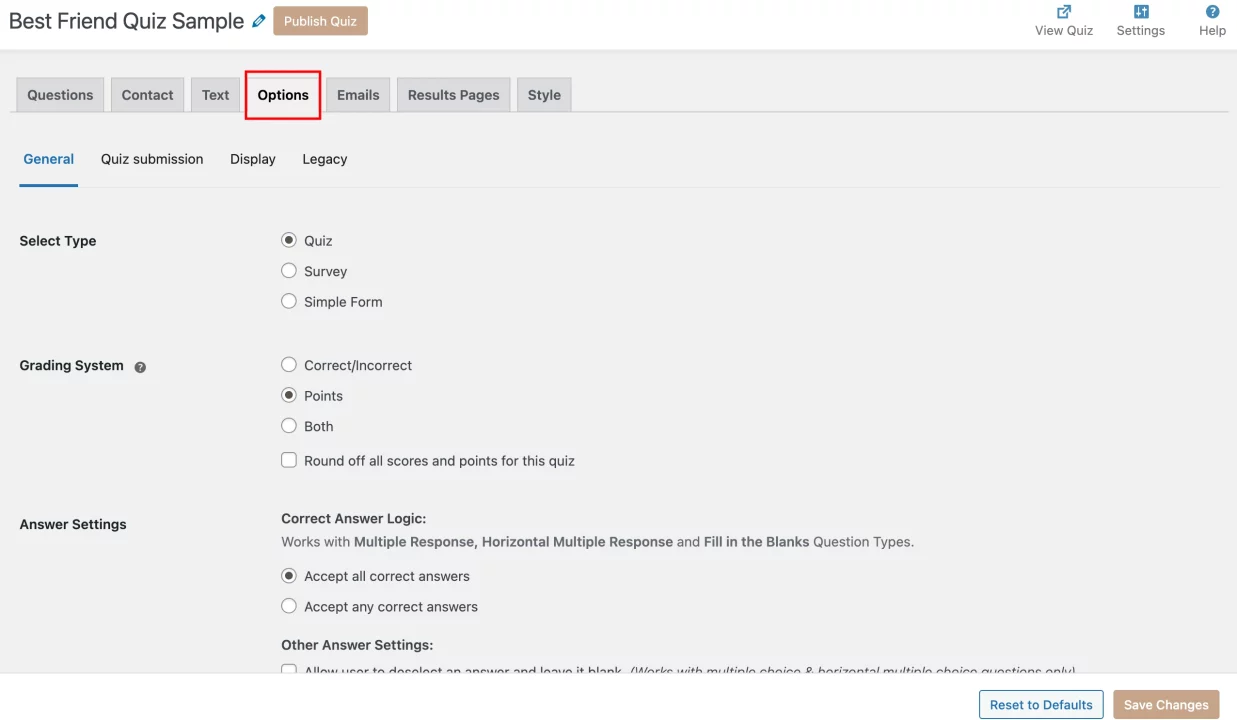
A progress indicator helps users know how much is left. This reduces drop-offs because people like knowing when they are close to finishing. Keep things simple at first. A smooth and clean quiz experience matters more than adding too many options.
Step 6: Create Personalized Result Messages and Result Emails
The results page is where the quiz feels complete. This is the moment users wait for, and it often decides whether they share the quiz with someone else. Keep result messages clear, friendly, and easy to understand.
Start by setting score ranges and writing a short message for each range. Higher scores can highlight how well someone knows their best friend, while lower scores should stay light and positive. Avoid harsh or negative language. The goal is to make the result feel fun, not judgmental.

You can also send result emails based on these score conditions. Set a simple rule for when the email should be sent, and use the user’s email field so the message goes directly to them. The email subject can include the quiz name, and the email content should mention the score and a short result message.
Use template variables like the user’s name, quiz name, and score to personalize each email automatically. This makes the email feel personal without extra effort and gives users something they can revisit or share later.
Step 7 (Optional): Use QSM Add-Ons to Improve Quiz Experience
These add-ons help you add useful features without complicated setup and make your best friend quiz more engaging and powerful.
Some useful QSM add-ons for a best friend quiz include:
- AI Integration: Helps create questions, answer options, and result text automatically, saving time and keeping the quiz clear.
- Save and Resume: Lets users pause the quiz and come back later without losing their answers.
- Advanced Timer: Adds a time limit to the quiz, useful if you want to turn it into a quick challenge.
- Reporting and Analysis: Shows how users are performing, which questions are most missed, and overall quiz engagement.
- MailChimp Integration: Connects quiz data with MailChimp so you can follow up with participants if needed.
- Google Sheets Connector: Automatically saves quiz responses to a spreadsheet for easy tracking and review.
How to Plan Questions for the Best Friend Quiz
Planning questions is the most important part of a best friend quiz. Good questions make the quiz feel personal, fair, and fun to finish. Poor questions make people guess randomly or quit midway.
Start by thinking about shared context. The best questions come from everyday life. Habits, routines, food choices, favourite activities, or small preferences work better than big or dramatic moments. If a question needs deep thinking or long explanation, it is not ideal for this type of quiz.
Next, balance the difficulty level. A good mix usually looks like this:
- A few easy questions that most close friends should get right
- A few medium questions that need attention to details
- One or two tricky questions that spark discussion later
Avoid making all questions hard. If users score very low, the quiz stops feeling fun. Keep questions clear and specific. Each question should have only one clear correct answer. If even you feel confused while setting the answer, reword the question. Ambiguous questions lead to unfair results.
Also, think about tone. Write questions the way people speak. Friendly and casual language works best. Formal wording creates distance and makes the quiz feel stiff.
Before publishing, read all questions once as if you are a friend taking the quiz. If the flow feels natural and the questions sound like real conversations, your quiz is ready.
To know how well do you know your best friend, try these questions
- What is your best friend’s favorite school subject?
- What is your best friend’s favorite animal?
- If your best friend got a tattoo, what would it be?
- What talent or ability does your best friend have?
- What is the craziest thing your best friend has ever done?
- What is your best friend’s favorite season of the year?
- What is your best friend’s favorite dessert?
Pro Tips to Create a Perfect Best Friend Quiz
For friendship quiz, try these practical add-ons that actually improve completion, accuracy, and sharing.
- Test once on mobile before publishing: Check button spacing, text length, and scrolling. Most users will play the quiz on their phone.
- Keep the number of questions limited: Around 8 to 12 questions is ideal. Longer quizzes often get abandoned before the results page, especially on mobile.
- Use template variables everywhere: Add %USER_NAME%, %QUIZ_SCORE%, and %QUIZ_NAME% in results and emails. It takes seconds and makes the quiz feel personal.
- Place the contact form after the last question, not at the start: This reduces drop-offs. Users are more willing to enter details once they are curious about their score.
- Write questions the way people talk: Avoid formal or complicated wording. If a question sounds like something you would ask a friend in real life, it will work better in the quiz.
- Keep result messages short and skimmable: Long result text looks fine in the editor but feels heavy on mobile. Two short paragraphs work best.
FAQs
How can I test my real best friend?
You can test a real best friend by seeing how well they know your habits, preferences, and small details about your life. A best friend quiz does this in a fun way by asking personal but light questions and checking how accurately they answer.
What questions are in a BFF quiz?
A BFF quiz usually includes questions about daily habits, favorite things, shared memories, likes and dislikes, and small personal choices. These questions are simple, relatable, and based on real-life friendship moments.
Can a quiz really test a friendship?
A quiz cannot fully measure a friendship, but it can show how well someone pays attention and remembers details about you. It works best as a fun activity that starts conversations, not as a serious test of friendship.
Can I create a best friend quiz for free?
Yes. You can create a best friend quiz using the free version of Quiz and Survey Master. It supports questions, scoring, result pages, and basic customization.
Making Your Best Friend Quiz Work Better
Creating a best friend quiz does not need to be complicated or time-consuming. With the right questions and a clear flow, you can turn a simple idea into something fun, personal, and shareable. Whether you want to use it for a friend group, a school activity, or a small event, a well-made quiz helps people connect and start conversations.
WordPress makes this process easier when you use a tool like Quiz and Survey Master. It handles the technical side, such as scoring, results, and emails, so you can focus on what matters more. That means writing good questions, keeping the experience smooth, and making the results feel meaningful.
Start small. Create one quiz, test it on your phone, and share it with a few friends. See how people respond and then make small improvements. Over time, you will understand what kind of questions work best and how to make results more engaging.