Conducting an online quiz competition becomes much simpler when you use a tool that handles questions, scoring, and results in one place. Quiz and Survey Master (QSM) is a WordPress plugin built to support quizzes for schools, colleges, and online events without technical effort.
Running them online may sound complex, but with the right tool, it becomes simple. Using Quiz and Survey Master (QSM), you can create, customize, and conduct quiz competitions that are engaging for students and easy to manage for teachers.
In this blog, we’ll look at what quiz competitions are, the types you can organize, and the exact steps to host one online using QSM.
Table of Contents
What are Quiz Competitions?
Quiz competitions are structured question-and-answer events designed to test knowledge within a set of clear rules. Participants answer questions, earn scores, and are evaluated based on their performance.
They are widely used in schools, colleges, and online events for learning, revision, and assessment. With digital tools, quiz competitions can now be conducted online, making them easy to manage while ensuring fair scoring and clear results.
Types of quiz competitions:
There are various types of quiz competitions with different approaches. Therefore, there are different rules for quiz competitions. Let us understand some basic types of quiz competitions:
- Academic: These are the competitions that take place at academic levels, online or offline.
- Entertainment: These competitions are meant for the purpose of entertainment through a knowledgeable or casual quiz. These are usually found online.
- Game shows: These competitions are also meant for the entertainment of the viewers; however, these are usually telecast over television, and some kind of prize or reward money is at stake or is provided.
Out of these types of quiz competitions, the most famous are the entertainment-based quizzes or game shows. They reach the masses and create a secular fan base over time.
But the times have changed, and we are digitalizing our lives, so why not digitalize the quiz competitions? Especially in the academic field of quiz competitions, there is a lot that can be done through online platforms!
Some common academic quizzes include:
These are just some sample academic quizzes that can be created online using the QSM plugin. Let us now understand how to conduct a quiz competition.
How to Conduct a Quiz Competition in WordPress
Running a quiz competition online becomes much easier when you use a tool that handles questions, scoring, and results in one place. Quiz and Survey Master (QSM) is a WordPress plugin built for this exact purpose. It lets you create quizzes, control how they behave, and show results automatically, without needing any coding.
For teachers, schools, and event organizers, QSM works as a complete system. You can add questions, collect participant details, set rules, and decide how results should be shown. Once the basic quiz is created, the real work begins in setting it up properly so the competition runs smoothly and feels fair to everyone.
Step 1: Add Quiz Questions and Set Scoring
This step defines what the quiz competition is testing. Questions are not just content here; they decide how balanced and meaningful the competition will be.
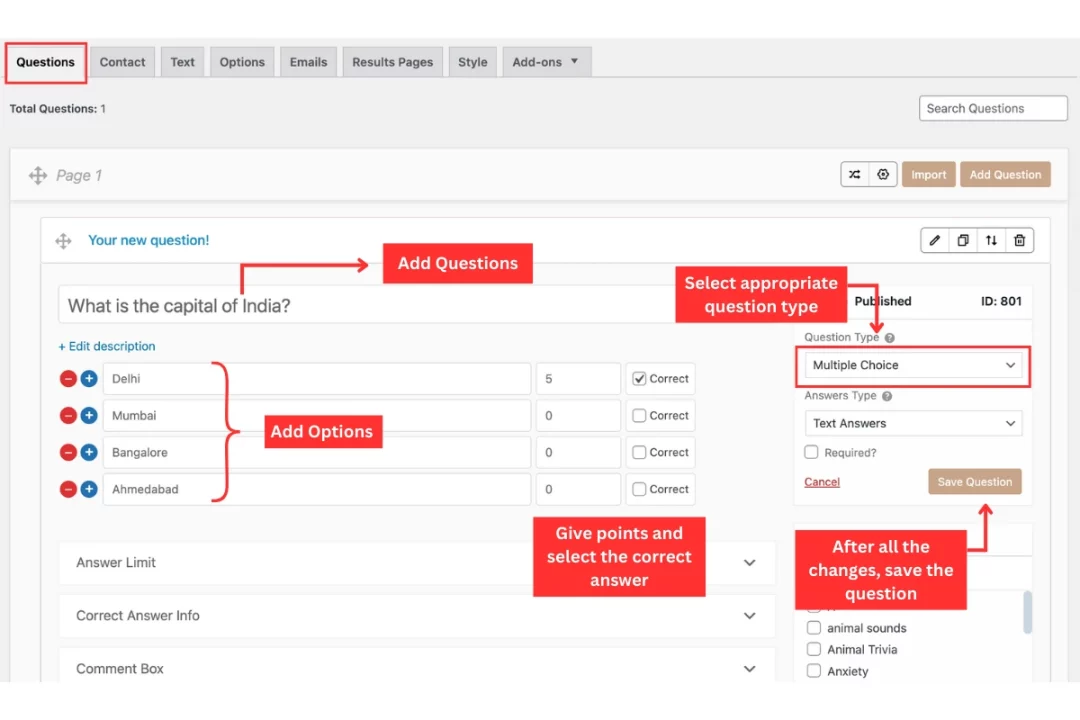
Inside the questions section, start adding your quiz questions one by one. Choose question types that fit your audience, such as multiple choice or true or false. For each question, mark the correct answer and assign points. This is important because the system uses these points to calculate scores automatically.
Setting scores correctly ensures there is no confusion later. When the quiz ends, results are generated instantly, and you do not need to check answers manually or worry about calculation errors.
Step 2: Create a Contact Form for Participants
A quiz competition only works if you know who is participating. This step helps you collect participant details so results can be linked to real people.
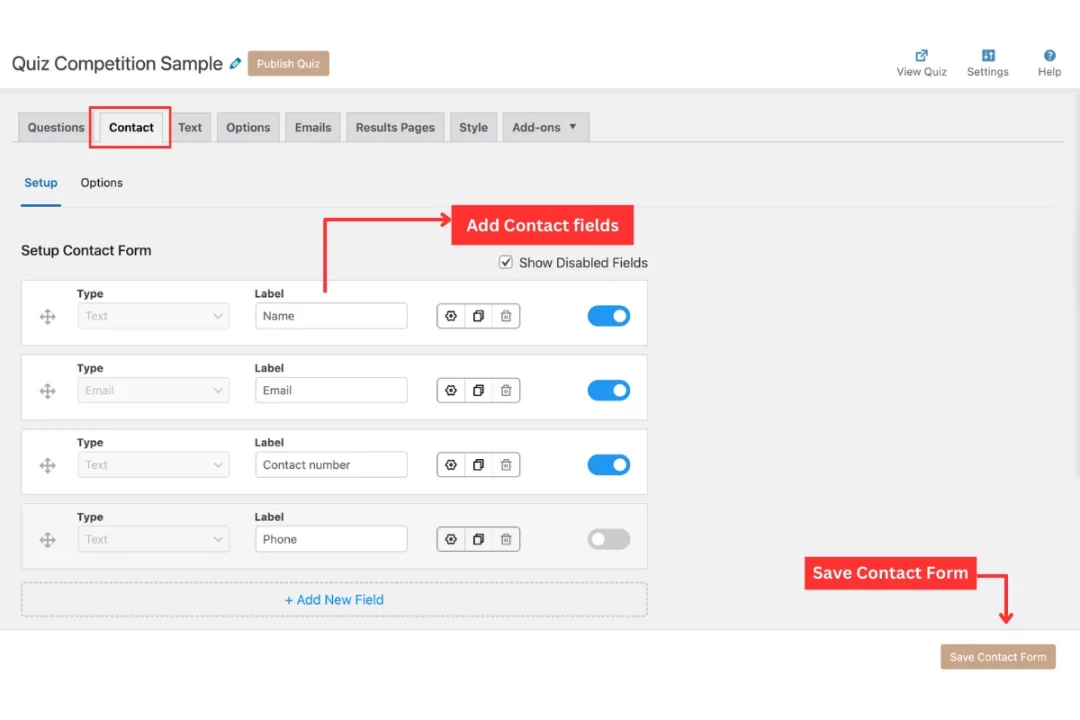
In the contact form section, add fields such as name, email address, class, or roll number. Keep the form simple and focused. Asking for only essential details makes participants more comfortable and reduces drop-offs.
This step is especially important if you plan to announce winners, send certificates, or share results later. Without participant information, managing a competition becomes difficult even if the quiz itself runs well.
Step 3: Add Instructions and Competition Rules
Clear instructions help participants understand what is expected before they start the quiz. This reduces confusion and creates a fair experience for everyone.
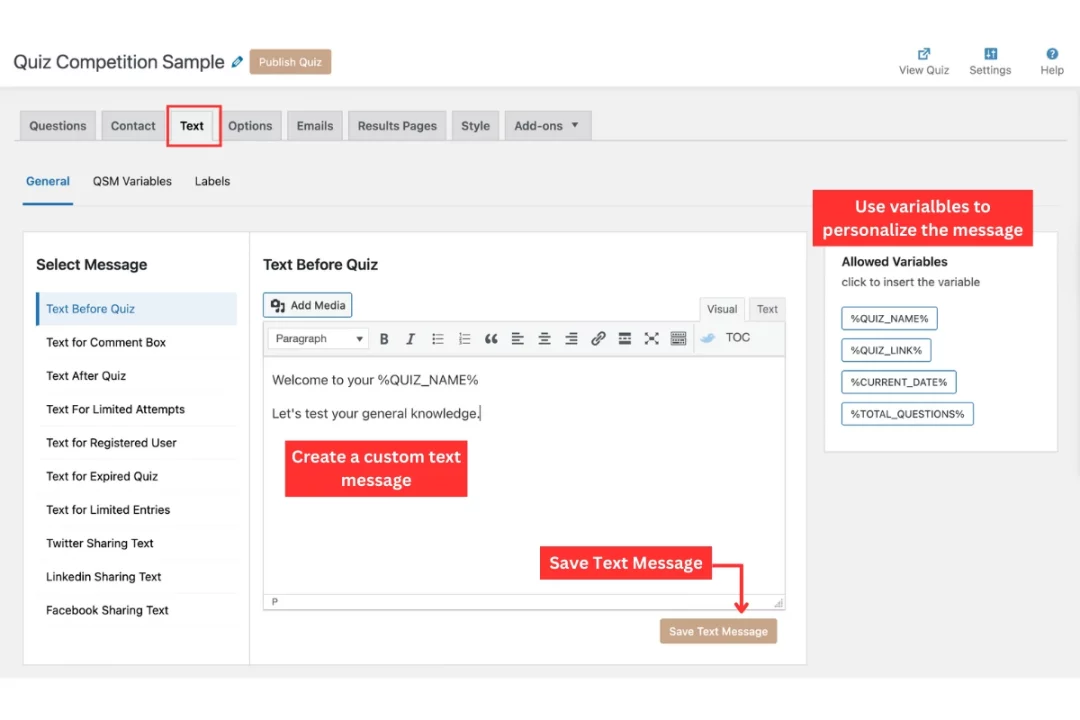
In the text section, add a short introduction explaining how the competition works. Mention details like the number of questions, whether there is a time limit, and how scoring is done. If there are specific rules, such as only one attempt allowed, this is the right place to state them. Use template variables to personalize the quiz.
When instructions are clear, participants focus on answering questions instead of worrying about how the quiz works. This also reduces questions and complaints later.
Step 4: Customize Quiz Settings and Appearance
This step controls how the quiz behaves while it is being taken. It plays a big role in keeping the competition fair and well structured.
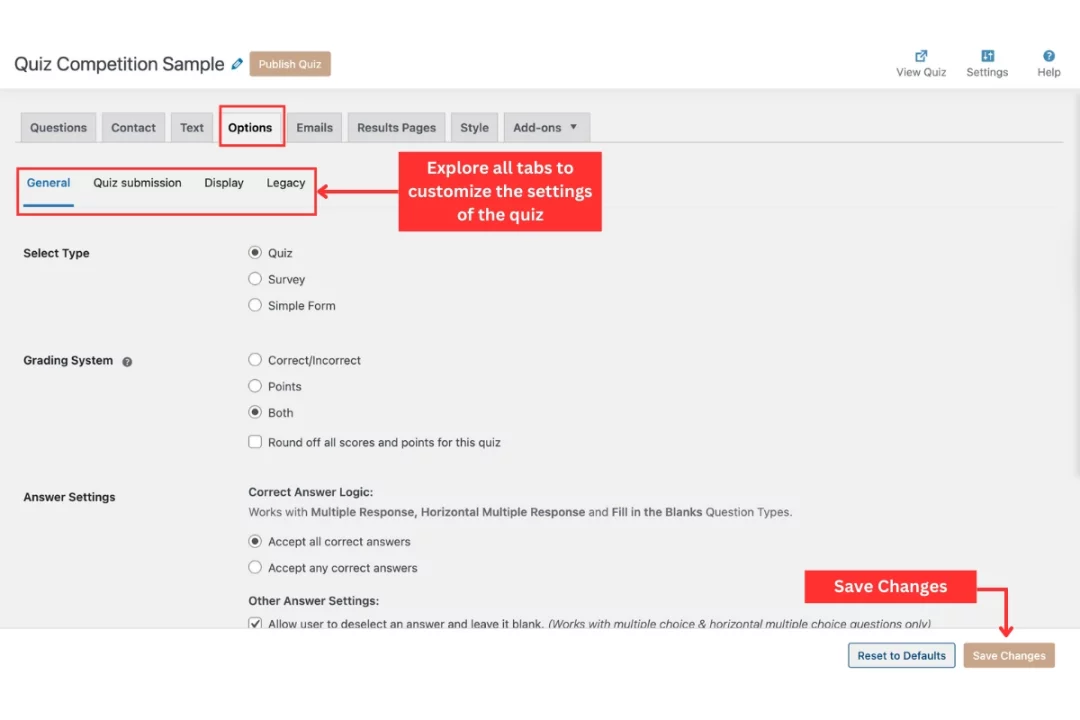
In the settings section, you can control things like question order, whether answers can be changed, and if questions should appear randomly. These settings help prevent copying and ensure that all participants get a similar experience.
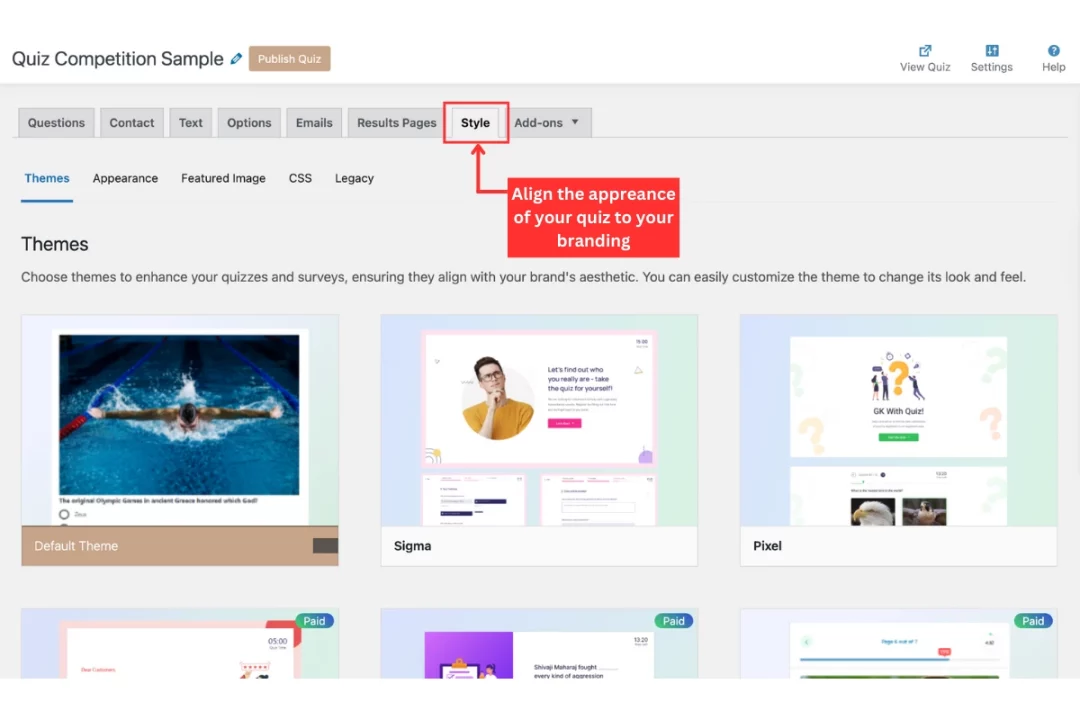
You can also adjust how the quiz looks so it feels clean and easy to read. A simple and well-designed quiz builds trust and keeps participants engaged until the end.
Step 5: Create the Results Page
The results page is where participants see the outcome of the competition. This step is important because it confirms completion and shows performance clearly.
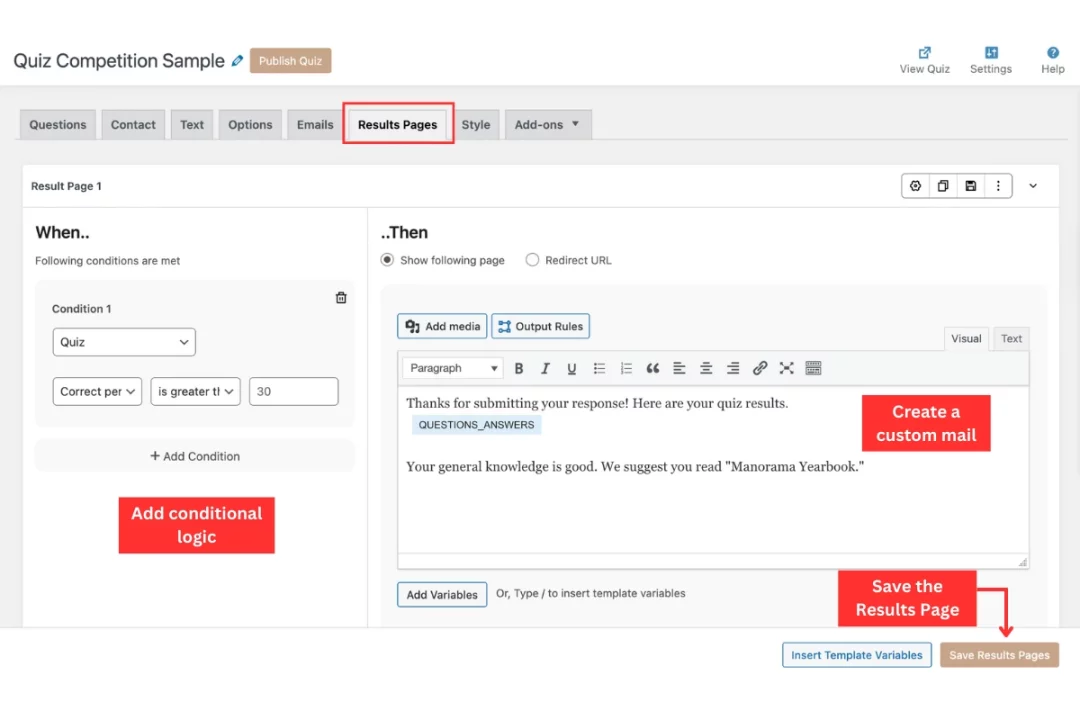
In the results section, decide what should be shown after submission. You can display scores, percentages, or simple messages based on performance. For competitive events, you may choose to show only the score and announce winners separately.
A clear results page avoids confusion and gives participants confidence that their submission was recorded correctly.
If you want to create a quiz in Google Forms, read How to Make a Google Forms Quiz? (5 Easy Steps).
How to Improve Your Quiz Competitions?
Here are some ways to conduct a quiz competition effectively:
#1 Pose intriguing questions
In the end, a quiz’s questions will make or break it. Therefore, it is crucial that you invest some time in researching questions that are pertinent to your campaign and audience and that you are aware your fan base will be interested in answering.
Questions ought to frequently center on the brand sector. For instance, if your business is in the travel industry, you should be posing inquiries about travel, etc. However, there are instances when it makes sense to involve your audience in a quiz that is themed around holidays like Halloween, Thanksgiving, or Christmas.
Check out some latest Trivia Questions and True and False Questions for your Quiz Competitions!
#2 Make rewards appealing
The most popular quizzes with the most entries also have excellent awards. Naturally, some fans and followers will participate in a contest if it’s entertaining and interesting, but ultimately, people enter contests in order to win prizes.
Therefore, you must make sure that the winning entry is honored in order to increase contest submissions! The award doesn’t have to be extremely expensive; it might be gift baskets, coupons for discounts, merchandise, or even recognition.
You are the best at knowing your audience and what prizes they are most interested in. So use your creativity and come up with the best award you can.
Also Read: How to Enhance your Quiz Results Pages
#3 Select and honor a winner
The campaign’s final chance to generate any buzz is now. Winners can be decided in a variety of ways, such as the highest score, or alternatively, why not put everyone who entered into the pot?
Be sure to blog about the winner after it is announced on your website, in your newsletter, and on your social media pages.
Your website will not only experience a final spike in traffic during this event, but the hype around the winner may also entice viewers to take part in future promotions.
Pro Tip: Power Up Your Quiz Competitions with Add-Ons
Creating a quiz competition with QSM is simple, but you can take it a step further by using powerful add-ons. These add-ons enhance the experience for both quiz creators and participants, making your competitions smoother, smarter, and more engaging. Whether you want better customization, advanced tracking, or professional-level features, QSM add-ons give you the flexibility to build exactly what you need.
Here are some of the most useful add-ons to consider:
- QSM Ultimate Add-On: Turn your quizzes into personalized experiences with bulk answer uploads, smart progress tracking, focused retakes, and customizable default themes. It streamlines creation, improves engagement, and gives you full design control.
- Quiz Proctor: Add a secure layer to your quiz competitions with monitoring features that prevent cheating and ensure fairness. Ideal for schools and professional assessments.
- Advanced Question Types: Move beyond standard formats with extra question types that make your quizzes more interactive and varied.
- Advanced Timer: Keep participants on track with customizable timers, countdowns, and time restrictions for individual questions or entire quizzes.
- Google Sheets Connector: Automatically sync quiz responses to Google Sheets for easy tracking, analysis, and reporting.
- reCAPTCHA: Protect your quizzes from spam entries and ensure only genuine participants can take part.
- Flashcards: Add flashcard functionality to turn quizzes into fun, interactive study tools for students.
- Leaderboard: Display real-time scores and rankings to encourage healthy competition and motivate participants.
- Certificates: Reward participants instantly with customizable certificates they can download and share once they complete the quiz.
By combining QSM with these add-ons, your quiz competitions can move beyond simple questions and answers. They become dynamic events that are secure, engaging, and tailored to your audience.
FAQs
What is a quiz competition?
A quiz competition is a structured question-and-answer activity where participants earn scores based on correct answers. It is commonly used in schools and online events to test knowledge and conduct fair assessments.
Do I need add-ons to run a basic quiz competition with QSM?
No. The free QSM plugin is enough to create and publish simple quiz competitions. Add-ons are optional, but they unlock advanced features that make quizzes more interactive, secure, and customizable.
How can I make a quiz competition more interesting?
You can make quizzes more engaging by asking intriguing questions, keeping the format interactive, and offering rewards. Adding features like timers, leaderboards, and certificates with QSM can boost participation and excitement.
Which QSM add-on is best for schools and educators?
The QSM Ultimate Add-On is highly recommended because it allows progress tracking, focused retakes, bulk answer uploads, and customizable themes. Educators also benefit from add-ons like Advanced Timer and Certificates for controlled assessments and recognition.
What are some good quiz topics?
Good quiz topics depend on the audience. For schools, common topics include science, maths, history, geography, and current affairs. For an online quiz competition, general knowledge, sports, movies, and technology also work well.
Elevate Your Quiz Competitions Today
Quiz competitions have always been a valuable part of learning, and moving them online only expands their possibilities. With Quiz and Survey Master, you can go beyond basic tests and create interactive competitions that keep students motivated and involved. Whether you need timed academic quizzes, casual trivia sessions, or school-level contests with results and leaderboards, QSM provides the flexibility to make it happen.
Teachers, educators, and even recruiters can use QSM to design competitions that are professional, customizable, and fun. Explore QSM bundles to unlock advanced features like analytics, certificates, and automated reporting, and take your quiz competitions to the next level.