The result page is the last screen a quiz user sees. When you design quiz results pages well, they keep users engaged, drive them to the next step, and reflect well on the brand behind the quiz.
For that to happen, the design does not have to be complicated. But it does have to be intentional. The right layout, the right amount of content, and a clear visual structure make the difference between a result page users read and one they close without a second thought.
This article covers what goes on a quiz result page, which layout fits which quiz type, and what to avoid when putting it together.
What Is a Quiz Result Page
A quiz result page is the screen that appears after a user completes a quiz. It shows the outcome based on their answers, whether that is a personality type, a score, a product recommendation, or a category result.
Every quiz has one, but not every quiz result page is built the same way. The content on the page depends on the quiz type. For instance:
- A knowledge test displays a score.
- A personality quiz shows a type.
- A product quiz surfaces a recommendation.
Users arrive at the result page after answering every question, so they are already invested in what they are about to see. A page that presents the outcome clearly holds that attention. A page that is cluttered, text-heavy, or visually inconsistent loses it quickly.
The result page is also a transition point. Once a user sees their outcome, they are looking for what to do with it. That makes it the right place to point them toward the next action, whether that is a product, a resource, or a follow-up step.
Key Elements of a Well-Structured Quiz Result Page
Before you design quiz results pages, you need to know what belongs on them. A result page does not need many components to work well. It needs the right ones, placed in the right order.
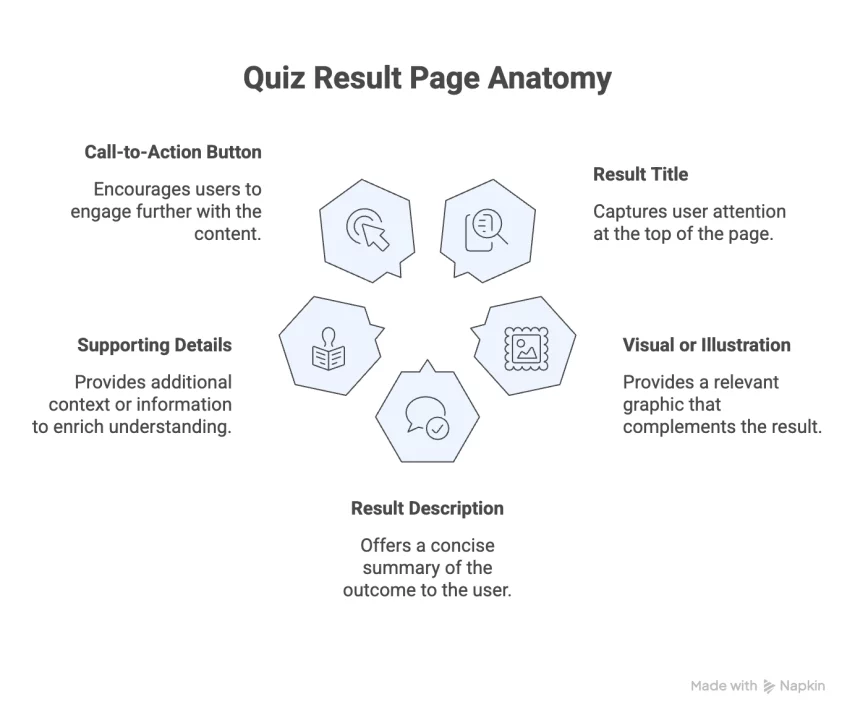
1. Result Title
The title is the first thing a user reads on the result page. It should name the result clearly and directly. “You are a Visual Learner” or “Your Score: 74/100” tells the user exactly where they landed. Keep it short and make it legible at a glance.
2. Result Description
A short paragraph below the title explains what the result means. Two to four sentences are enough. Write in plain language; this is not the place for technical detail or long explanations.
3. Visual Elements
An image, icon, or illustration makes the result page easier to read and gives it visual structure. Choose visuals that are relevant to the specific result, not generic placeholders. Personality results work well with illustrations; product results work well with product images.
4. Supporting Details
Some results benefit from additional context, such as a breakdown of answers, a list of traits, or supplementary information tied to the outcome. This section is optional. Include it only when it adds something concrete, not as a default addition to every result.
5. Call-to-Action
Place one call-to-action on the results page, positioned below the result description. It should be visible without requiring the user to scroll past large blocks of content to reach it. One CTA per page is enough.
Common Quiz Result Page Layouts
The layout you choose when you design quiz results pages depends on your quiz type and how much information the result needs to communicate. These are the most common structures.
Simple Layout
A simple layout works well for Buzzfeed-style personality quizzes, category results, and any quiz where the outcome is straightforward. It includes:
- A result title
- A short description
- A relevant image
The page stays uncluttered, and users can read it in one pass.
Detailed Layout
A detailed layout follows the same foundation as a simple one but adds structured sections below for quizzes that need more explanation, such as a multi-part personality profile or a detailed assessment outcome. It includes:
- A result title
- A short description
- Multiple short content sections, each with its own heading
- Extended copy where needed
A detailed layout does not mean a long page. It means a structured one. Keep each section focused on one point and avoid combining multiple ideas into a single block of text.
Product Recommendation Layout
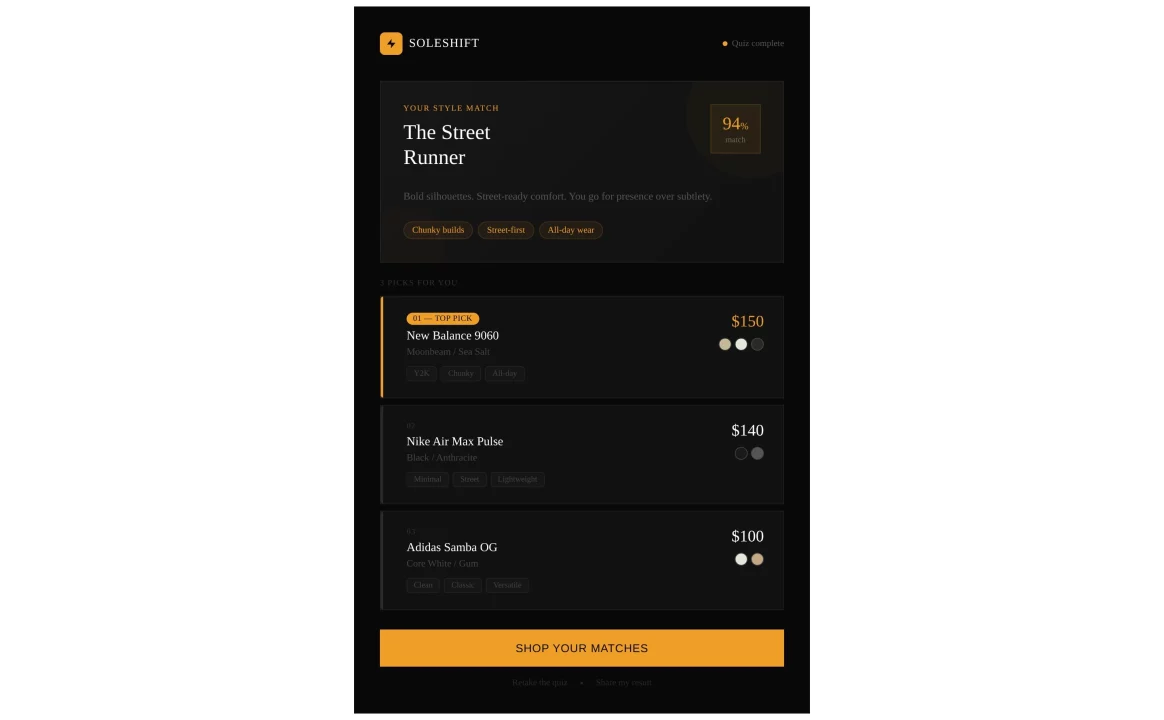
Product recommendation layouts are generally built for e-commerce and service-based quizzes where the result maps directly to a product or offer. The page leads with the result and moves quickly to the recommendation. It includes:
- A result title that connects the outcome to the product
- A featured product with a clear image and short description
- A visible call-to-action that links to the product page
Score-Based Layout
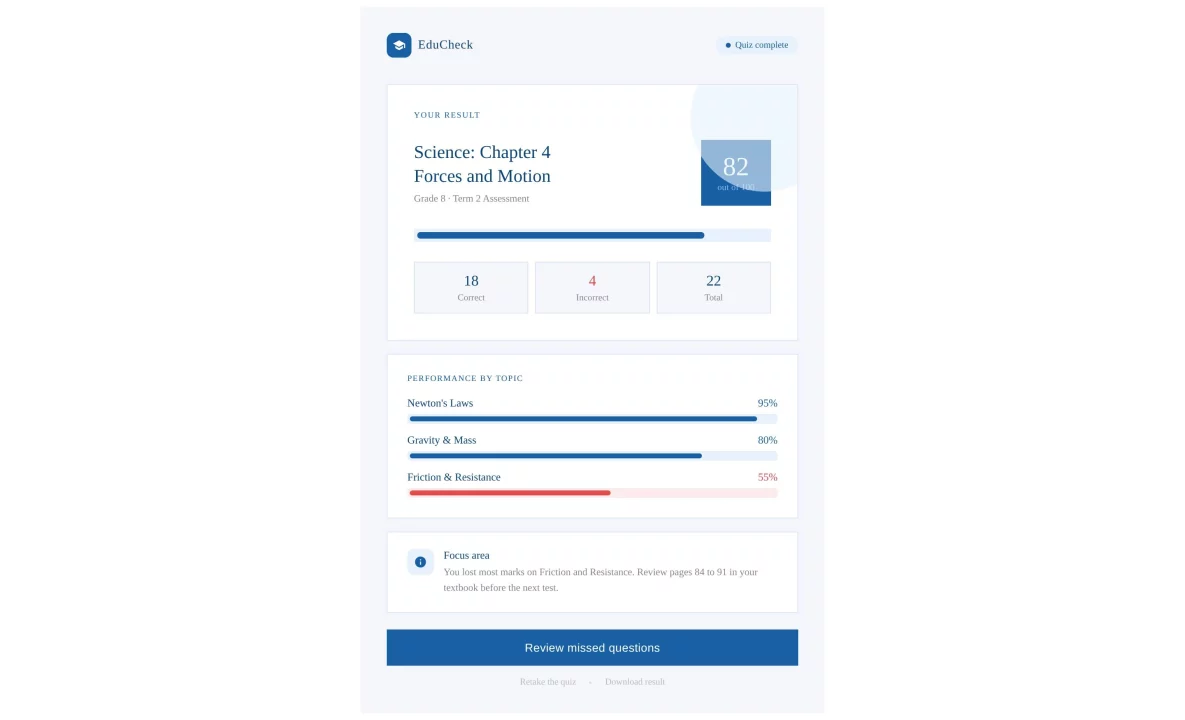
Used for knowledge tests, assessments, and any quiz that produces a numerical result. The score should be the most prominent element on the page. It includes:
- A score displayed clearly as a number or percentage
- A short explanation of what the score range means
- A next step, such as a link to a relevant resource, a certificate, or a retake option
Avoid placing the score below a block of introductory text. Users come to this page to see their number; show it first.
How to Structure Result Content Clearly
The result page is not a blog post. Users do not read it from top to bottom; they scan it. The structure you use when you design quiz results pages determines how quickly they find what they came for.
Readability comes from how content is arranged, not just what it says. These habits keep the result pages clear and easy to move through:
- Anchor with a heading. Place the result title at the top of the page so users see their outcome the moment the page loads.
- Keep paragraphs short. One idea per paragraph. If a paragraph runs past three lines, split it.
- Use bullet points for lists. Traits, tips, and itemized information read better as bullets than as sentences strung together.
- Left-align body text. Centered body text is harder to read across screen sizes, particularly on mobile.
- Maintain font hierarchy. Use consistent font sizes across the title, description, and supporting content so users can move through the page without effort.
- Leave white space between sections. A compressed page feels harder to read, even when the content is good. Space gives each element room to register.
- Limit the number of sections. Include only what the result genuinely needs. Every extra section competes with the ones that matter.
Adding Visuals to Improve Result Pages
Visuals do practical work on a result page. They break up text, give the page structure, and make the outcome easier to read at a glance. When you design quiz results pages, choosing the right visuals matters as much as the copy.
Here is what to consider for each visual element:
- Images. Use images specific to the result, not generic stock photography. A product quiz result should show the recommended product; a personality result works well with a relevant illustration.
- Icons. Keep the icon set consistent across all result variations. Mixing styles from different sets makes the page look unfinished.
- Color consistency. Each result can use a distinct color to differentiate outcomes, but keep those colors within a defined palette. Too many unrelated colors create a disjointed experience.
- Brand alignment. The result page should look like it belongs to the same site as the rest of the quiz. Use your brand’s primary colors for headings and CTA buttons, and keep background colors neutral unless your design system specifies otherwise.
Customizing Quiz Results in QSM
Tools like Quiz and Survey Master (QSM) let you design quiz results pages directly within the plugin. No custom code is needed for the core design decisions.
Here is what you can do within QSM to design quiz results page:
- Edit result text: Write or update the title and description for each result outcome directly in the plugin settings.
- Assign outcomes: Map specific results to score ranges or answer combinations so each user sees the result that matches their responses.
- Add images: Attach an image to individual result entries to give each outcome a relevant visual.
- Customize layout: Adjust what appears on the result page and in what order, keeping the structure aligned with your quiz type.
- Set up multiple result tiers: Use conditional logic to create different result pages for different score ranges or answer paths, so each outcome has its own dedicated page.
- Add a CTA per result: Include a separate call-to-action for each outcome, pointing users to a relevant product, resource, or next step.
Examples of Well-Structured Quiz Result Pages
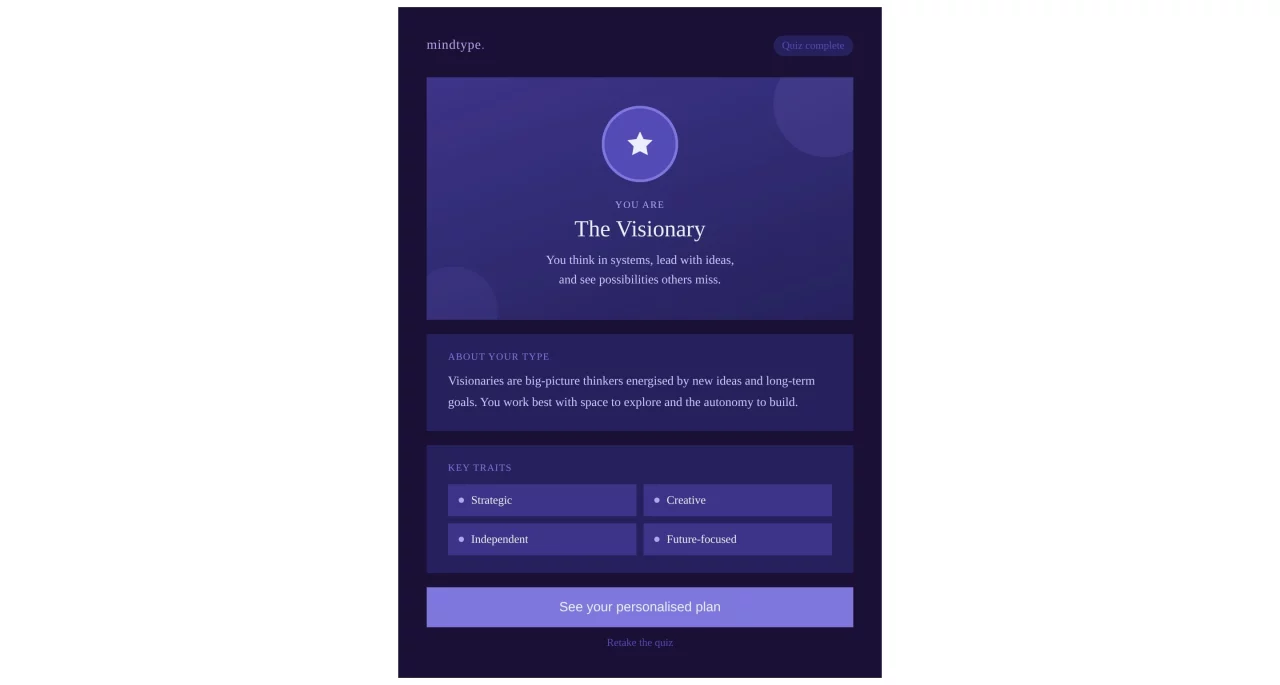
1. Personality Quiz Result Layout
2. Product Recommendation Quiz Result Layout
3. Test-Based Quiz Result Layout
Design Mistakes to Avoid
Most problems appear the moment the page loads. Keeping these in mind helps you design quiz results pages that actually work.
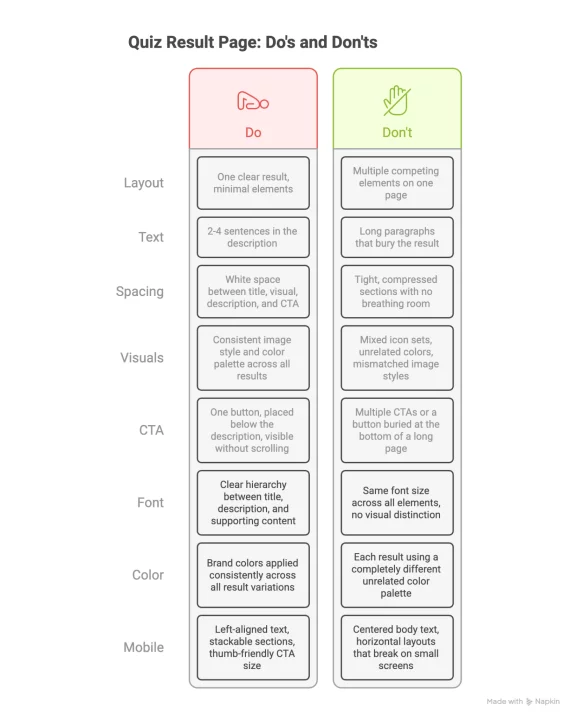
- Cluttered layout: A result page that tries to show everything at once makes it hard to find the actual result. Each element competes for attention, and nothing lands clearly. Stick to the components the result genuinely needs and remove the rest.
- Too much text: A result page is not the place for long explanations. If the description runs past four or five sentences, it is doing too much. Move any supplementary information to a linked page, or cut it entirely.
- Poor spacing: Tight spacing makes a page feel compressed and harder to read, even when the content itself is good. Give each section room between the result title, the description, the visual, and the CTA. White space is not wasted space.
- Inconsistent visuals: Mixing image styles, combining unrelated color palettes, or using icons from different sets across result variations makes the page look unfinished. Pick a visual direction and apply it consistently across every result on the page.
Where This Fits in Your Quiz Flow
The result page is the final screen in your quiz sequence. Understanding how to design quiz results pages well matters most here, because users have just answered every question and are ready to act.
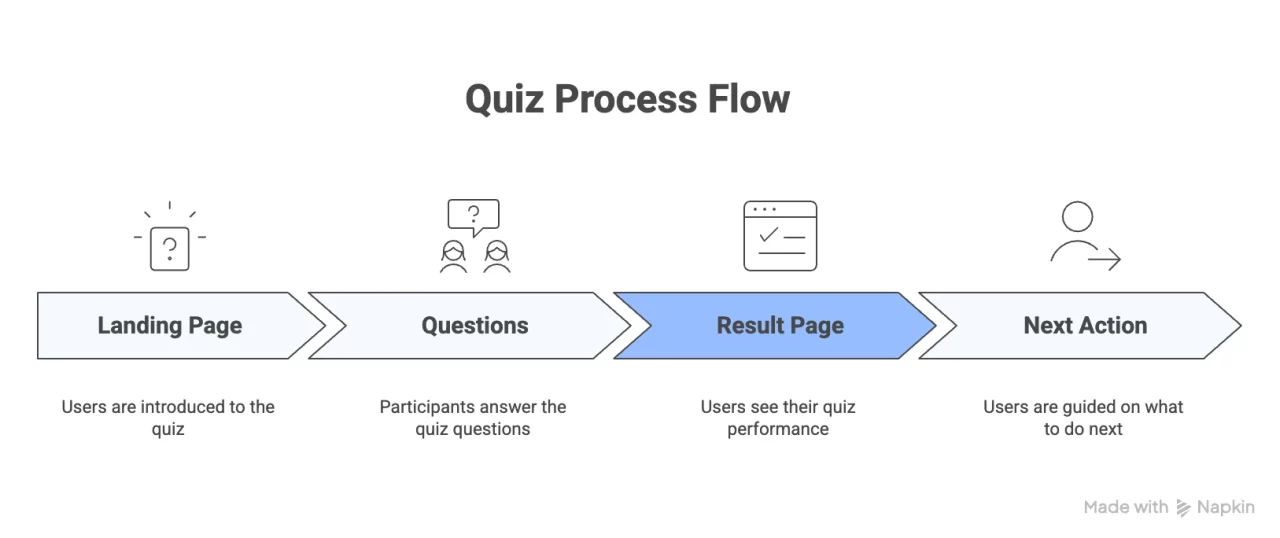
Landing page → Questions → Result page → Next action
Each stage feeds into the next. The result page is not the end of the interaction; it is the handoff point between the quiz and whatever follows it.
Getting this page right matters because the user has just answered every question and is ready to act. What the result page gives them determines where they go next.
To understand how the result page connects to the other parts of your quiz, read how to build a quiz funnel.
Improve Your Quiz Result Page
Knowing how to design quiz results pages comes down to a few consistent decisions: a clear title, a short description, a relevant visual, and one visible call-to-action. The layout you choose should match your quiz type, and the content on the page should only include what the result actually needs.
If your current result page feels cluttered or hard to read, start with structure. Fix the layout first, then look at spacing, then visuals. Most result pages improve significantly by removing elements, not adding them.