An office trivia quiz is a scored set of questions about NBC’s The Office (2005-2013), built for fan engagement or workplace team-building. If you run a fan blog, a pop culture site, or you’re organizing a team-building round themed around The Office, a Google Form won’t give you what you need. No scoring, no branded results page, no lead capture, no embed.
This guide gives you a copy-ready bank of 25 trivia questions about The Office, plus a step-by-step build in QSM (Quiz and Survey Master) so the quiz lives on your own site, looks the way you want it to, and actually does something useful when people finish it. The whole setup takes under 20 minutes.
Two ways people use The Office trivia quiz (and why a form isn’t enough)
The audience for an Office trivia quiz splits into two groups that want different things from the same format.
Fan blogs and pop culture sites
If you’re publishing a trivia quiz about The Office as a content asset, a generic form tool leaves you with no scoring, no shareable results, no leaderboard, and no way to capture emails from completions.
You also can’t embed it on your own domain, which means sending traffic elsewhere and losing the engagement data entirely.
Workplace team-building
HR managers, team leads, and office culture organizers running a scored office trivia quiz, a fun challenge, Friday meeting, or a remote all-hands need more than a form link. A shared leaderboard matters. So does something polished enough to put in front of colleagues.
And if your website is built on WordPress, then the QSM plugin not only runs on WordPress but also keeps your quiz on your own domain and connects to add-ons for lead capture and leaderboards.
It’s the engagement layer you own, with the audience data staying in your hands. If you’re thinking about quizzes as a broader content or growth strategy, building a quiz lead magnet into your results page is where that funnel starts.
25 The Office Trivia Questions With Answers
Use these to build your office trivia quiz as-is or swap in your own. They’re grouped by difficulty so you can build tiered rounds or mix them freely. Once your quiz is set up in QSM, loading these takes about five minutes.

10 Easy The Office Trivia Questions (Characters)
- What is Dwight Schrute’s official job title for most of the series?
Assistant (to the) Regional Manager
- What is the name of Kevin Malone’s band?
Scrantonicity
- What is Angela’s last name before she marries?
Martin
- Which character is a volunteer sheriff’s deputy?
Dwight Schrute
- Who does Pam Beesly plan to marry at the start of the series?
Roy Anderson
- What does Michael Scott call his improv alter ego?
Michael Scarn
- Which character says, “I am Beyoncé, always”?
Michael Scott
- What is Ryan Howard’s job title when he first joins Dunder Mifflin?
Temp
- What is the name of the bar the Dunder Mifflin staff regularly visits?
Poor Richard’s Pub
- What does Creed Bratton claim his job title is?
Quality Assurance
8 Medium The Office Trivia Questions (Episodes & Quotes)
- Finish the quote: “I’m not superstitious, but I am a little…”
Stitious
- In “Threat Level Midnight,” what sport does Michael Scarn play to save the hostages?
Hockey
- What prank does Jim pull involving Dwight’s stapler?
He puts it in Jell-O
- What is the name of Andy Bernard’s a cappella group at Cornell?
Here Comes Treble
- In which episode does Michael Scott walk across a coal bed?
Beach Games (Season 3)
- What does Michael name his improv film?
Threat Level Midnight
- What holiday does Dwight create as an alternative to Christmas?
Recyclops Day
- What is the name of the pizza delivery boy Dwight holds captive in the office?
Justin
7 Hard The Office Trivia Questions (Deep-Cut Detail)
- What is the name of Dwight’s pet porcupine?
Henrietta
- What is written on the bottom of Michael Scott’s “World’s Best Boss” mug?
He bought it for himself; the mug just reads “World’s Best Boss.”
- What is the full name of Phyllis’s husband, including his business?
Bob Vance, Vance Refrigeration
- In “Casino Night,” how many women does Michael invite as his date?
Two: Carol Stills and Jan Levinson
- What does Kevin spill in the parking lot in “Classy Christmas”?
His chili
- What is the name of the Dunder Mifflin supplier that Dwight cuts out to start his own paper company?
Prince Family Paper
- What song does Andy serenade Erin with using a banjo?
“I Will Remember You” by Sarah McLachlan
Use these as the base for your quiz, or pull from the deep-cut round to build a harder tier for true fans. Here’s how to add them into QSM and get the quiz live.
How to build your The Office trivia quiz in QSM (5 steps)
Before starting, make sure QSM is installed and activated on your WordPress site. Create a new quiz, name it “The Office Trivia Quiz,” and select Quiz as the type. This sets up the base structure where all your questions, settings, and results will live.
Step 1: Pick a scored quiz type
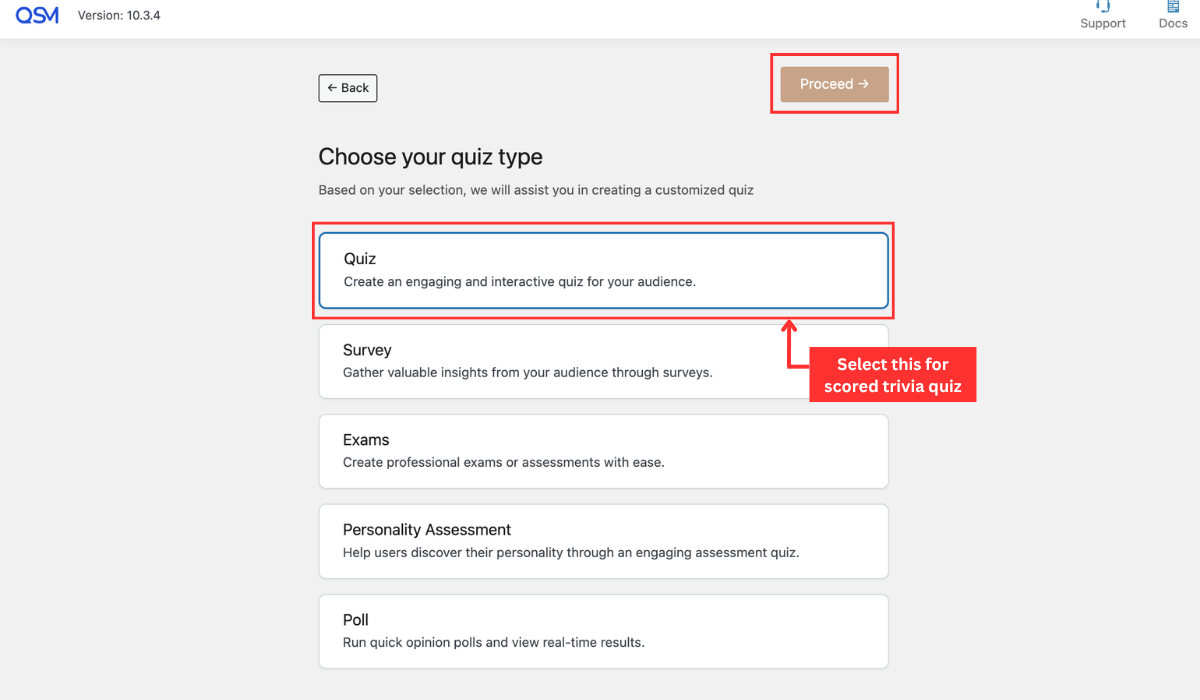
In the quiz settings, select a points-based or graded quiz type. This tells QSM to track correct and incorrect answers and calculate a final score, which later drives the results page logic.
Result: a graded quiz that auto-calculates scores per question.
Step 2: Add your questions and set the correct answers
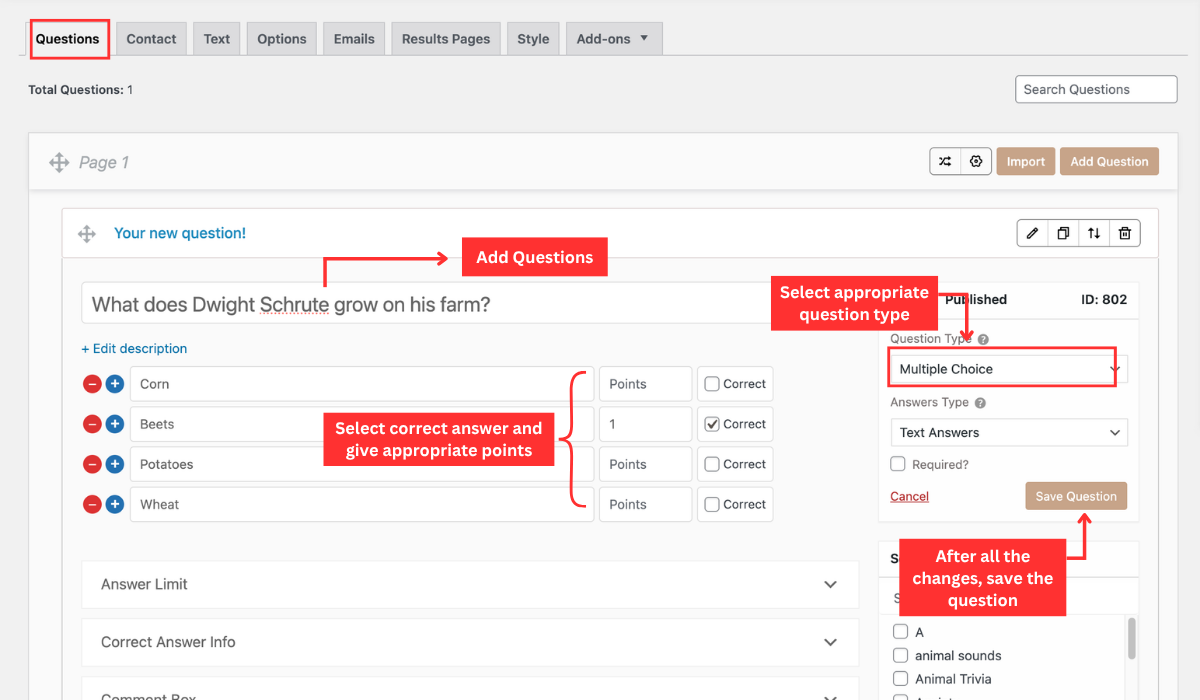
Go to the Questions tab. Add each question individually: enter the question text, select Multiple Choice as the question type, then fill in the answer options below. Mark the correct answer and assign points to it. Wrong answers get zero. For the deep-cut round, assign higher points to reflect the difficulty.
Want more control? Try the Ultimate add-on
- Bulk answer add: Add multiple answer options at once instead of one by one
- No-grading mode: Run the quiz without scoring for casual team rounds
- Question progress bar: Shows participants how many questions remain
- Confetti animation: triggers on completion for a visual payoff moment
- Require email to access quiz results: gates the results page behind an email field
- Input custom answer: adds an “Other” option so participants can enter their own response
Step 3: Brand the quiz
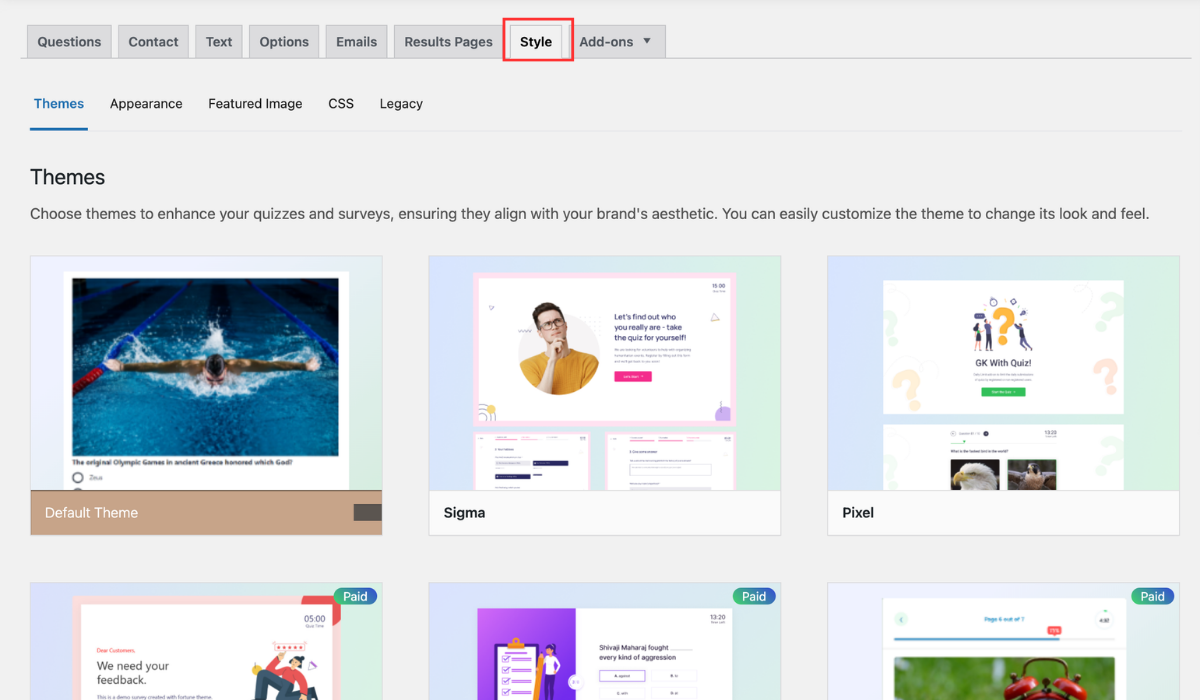
Go to the Settings tab. Select a theme from QSM’s preset options for a quick visual update, or use the custom CSS field for precise control over fonts, colors, and layout. If you want to stay on the default theme but still adjust how it looks, the Ultimate add-on’s theme customizer lets you change colors, fonts, button styles, timers, and answer choices without switching themes. Add your intro text and participant instructions here. For a workplace round, a consistent visual treatment makes the quiz feel deliberate rather than default.
Result: a quiz that looks intentional and matches your site or event branding.
Step 4: Set up your results pages
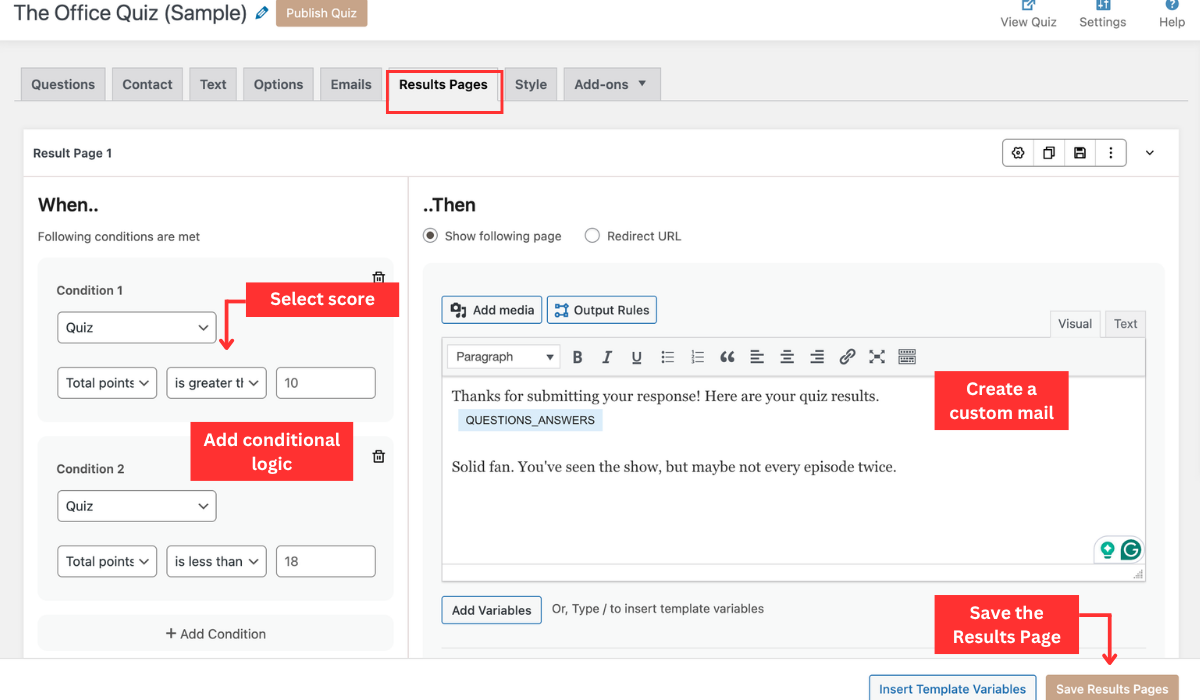
Open the Results Pages tab and create three result pages, one for each score tier. Set the minimum and maximum score range as the condition for each page, then write the result text for that range.
- 0 to 9: “You’re basically Toby. Nobody’s fault, really.”
- 10 to 19: “Solid fan. You’ve seen the show, but maybe not every episode twice.”
- 20 to 25: “That’s what she said. You know every episode, every quote, and apparently every porcupine name.”
If you’re capturing emails, QSM connects directly with MailerLite, MailChimp, and ActiveCampaign. You can map quiz responses to custom fields in your email platform, assign participants to subscriber groups based on their score tier, and choose between automatic or consent-based sign-ups, all without leaving WordPress.
Go to the Emails tab to configure result emails. Set the subject line, message body, and pull in dynamic variables like the participant’s name and final score. For a workplace round, this is the record of who scored what. For a fan blog, it keeps your quiz in the participant’s inbox after they’ve left the page.
Result: three scored result pages live, with result emails configured and participants feeding into your email list by score tier.
Step 5: Embed on your site or share the link
To embed the office trivia quiz, copy the QSM shortcode and paste it into any WordPress page or post. The office trivia quiz loads inline on your domain with no redirect. For a team-building round over a video call, share the direct URL instead. All responses are logged automatically in your QSM dashboard.
Result: the quiz is live on your site, embeddable anywhere, and logging every response automatically.
Three add-ons that make your Office trivia quiz work harder
The base quiz handles scoring and results. These three add-ons turn it into a lead-generation tool, a team competition, or a multi-tier fan challenge.
| Add-on | What it does | Best for | Free / Paid |
| Contact Form | Gates the results page behind an email field so participants enter their email before seeing their score | Fan blogs, lead capture | Free |
| Leaderboard | Displays ranked scores across all quiz attempts | Team-building, competitions | Paid |
| Conditional Logic | Routes participants into different question paths based on earlier answers | Tiered fan rounds | Paid |
| Advanced Timer | Sets time limits at the quiz, section, or page level to control pacing and keep participants focused | Timed challenges, assessments | Paid |
| Simple Popups | Opens the quiz inside a popup via a single link, no page redirect needed | Embedding on landing pages, campaigns | Paid |
Frequently asked questions
What are good Office trivia questions?
– What is Dwight Schrute’s official job title? (Assistant to the Regional Manager)
– What does Jim put Dwight’s stapler in? (Jell-O)
– Which character says “I am Beyoncé, always”? (Michael Scott)
– What is the name of Kevin Malone’s band? (Scrantonicity)
– What is the name of Dwight’s pet porcupine? (Henrietta)
For the full list of 25 questions across easy, medium, and hard difficulty, see the question bank above.
What is the hardest The Office trivia question?
Anything about background details. Most people know Jim put Dwight’s stapler in Jell-O. Far fewer know Dwight’s pet porcupine is named Henrietta. If you want to separate real fans from casual viewers, the deep-cut round in the question bank above is a good place to start.
How many questions should a The Office trivia quiz have?
15 to 25 for a fan blog or casual round. Completion drops past 25 for general traffic. For a dedicated team competition or fan event, 40 or more works fine.
Is there an official The Office trivia quiz?
No. NBC has never released one. The quizzes on Sporcle, ProProfs, and BuzzFeed are fan-made, which is exactly why building your own branded version makes sense. You own the experience and the audience data.
How do I make a The Office trivia quiz for free?
QSM’s free plan covers the full core build: questions, scoring, and embedding. Lead capture, leaderboards, and conditional logic are paid add-ons, but the quiz runs without them.
Can I add a leaderboard or collect emails?
Yes to both. The Leaderboard add-on ranks scores across all attempts. QSM’s built-in Contact tab lets you gate the results page behind an email field. Both work independently.
Can I use The Office trivia quiz commercially?
For internal team-building events, HR activities, and corporate gatherings, fan-made trivia rounds are generally considered fair use. If you’re charging entry fees or monetizing the quiz directly, consult a legal professional.
Launch Your The Office Trivia Quiz in 20 Minutes
The question bank is ready. The five-step build takes under 20 minutes on a live WordPress site. Whether you’re running it as a content asset on a fan blog or a team-building round at work, the setup is the same, and everything stays on your domain.
If you’re thinking about quizzes beyond this one, the same setup is the foundation for a quiz lead magnet that keeps collecting emails long after the post goes live, and the results page is where zero-party data collection starts.