Have you ever wondered how to find your mental age, not the number on your ID, but the age your mind actually behaves at? A free mental age test gives you that answer in a surprisingly fun and accurate way. Instead of asking for facts or figures, it analyzes your habits, daily choices, and how you respond to everyday situations to reveal how old you think and feel.
That’s why mental age quizzes have become infamously popular online. They are quick to take, share, and often lead to conversations you didn’t expect. Beyond fun, they give you something to reflect upon, because how you calculate your mental age says a lot more about your personality.
To give you a head start, this article walks you through exactly how mental age is calculated, what factors influence it, and how you can build your own mental age quiz.
Table of Contents
How to Calculate Mental Age?
Your mental age is not similar to your birth age, and it is not calculated based on what you know. It is calculated by looking at how you think and behave in real situations.
A mental age calculator works by asking you a set of questions about your habits, preferences, and emotional responses to different situations given. Each answer is given a score, and your total score is mapped to a mental age range.
Let’s say your responses depict you’re spontaneous, go with the flow, and live in the moment, then it might point towards a younger mental age. And if you lean towards more structured, disciplined, and calm under pressure, your results may reflect a mature age group.
The quickest way to find your mental age is to simply take the test. No math, no sign-up, no waiting.
Curious what your mental age actually is? Take our demo mental age test below and get your results. Just answer honestly to see what comes up.
Important disclaimer – A mental age quiz is not a clinical or medical test. It does not diagnose mental health or measure intelligence. The results are meant for insight, reflection, and fun. The accuracy of the result depends on honest answers and well-designed questions.
If you are looking to create a mental health quiz, read How to Create a Mental Health Quiz in WordPress.
How to Create a Mental Age Quiz?
Before adding anything, make sure Quiz and Survey Master (QSM) is installed and activated on your WordPress site. Once activated, create a new quiz, give it a clear name like Mental Age Quiz, and select Quiz as the type. This sets up the basic structure where all questions, texts, settings, and results will live.
After this, you can quickly start building the quiz in a way that matches how mental age is actually estimated.
Step 1: Add Mental Age Questions and Options
Start in the Questions tab. This is the most important step because mental age is calculated entirely from users’ answers to these questions. So the very first step of the mental age quiz is to add questions.
A mental age quiz should focus on habits, preferences, and decision-making, not facts. Begin with a multiple-choice question that reflects everyday behavior.
For example, you can ask how someone usually spends their free time and give options that range from impulsive and casual to calm and structured. Assign lower points to carefree options and higher points to thoughtful ones. This scoring helps QSM group users into different mental age ranges later.
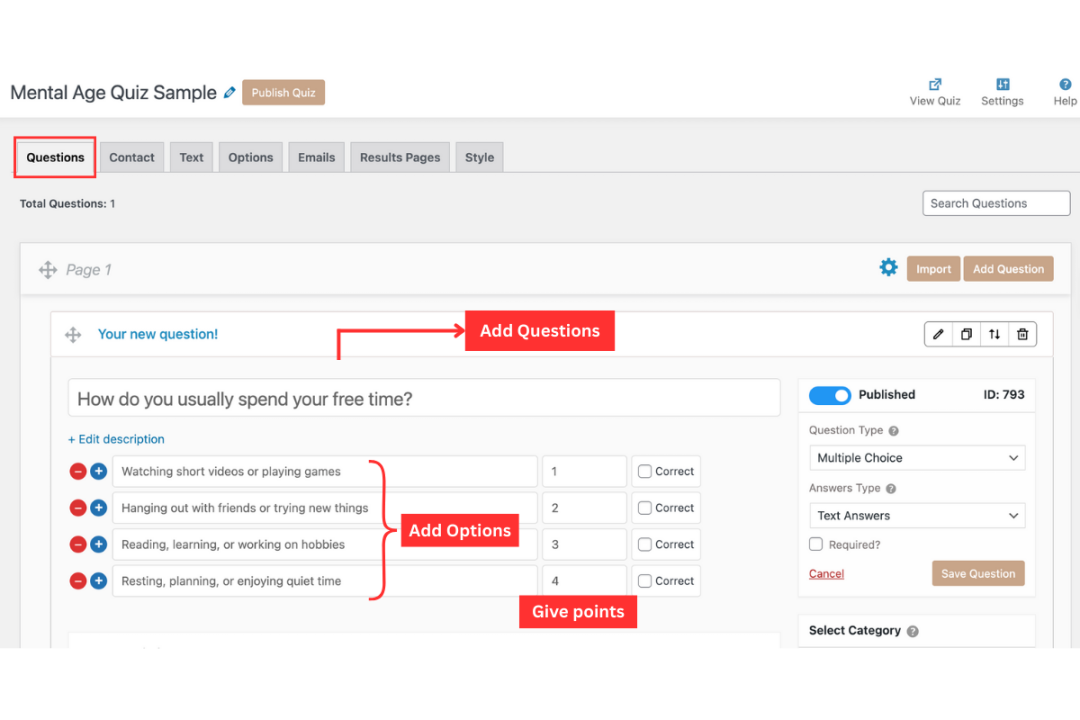
Add a true or false question to keep the quiz easy and fast to complete. A statement like “I prefer routine over sudden changes” works well because it directly reflects the mindset. These questions reduce effort for users and balance longer multiple-choice questions.
At this stage, the goal is not to trick users but to make them respond honestly. Clear wording and sensible scoring are what make the final result feel believable.
Step 2: Set Up the Contact Form
Once questions are ready, move to the Contact tab. This is where you decide if you want to collect any basic user details via a contact form.
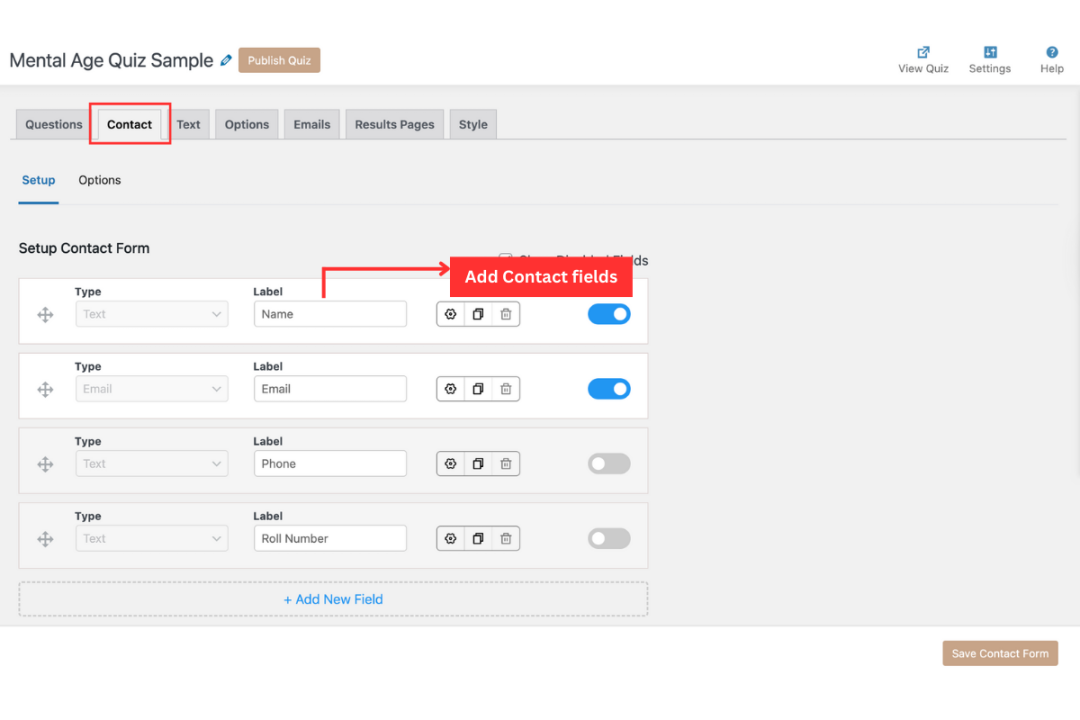
For a mental age quiz, collect name, email address, and contact number. It allows you to personalize results, which makes the outcome feel more relevant.
Email collection should only be added if you actually plan to send results and create quiz lead magnets. Otherwise, keeping it optional helps more users finish the quiz.
This step supports engagement without slowing users down or making the quiz feel intrusive.
Step 3: Add Custom Texts for Clarity
Next, open the Text tab. This section controls all the messages users see while taking the quiz.
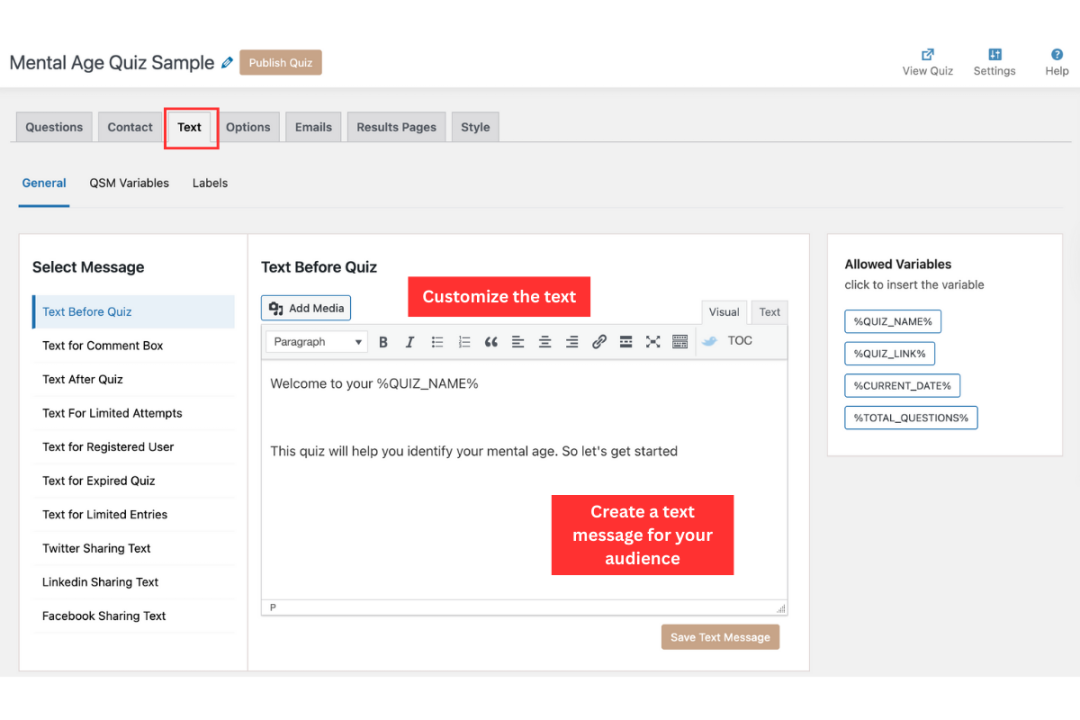
Use the intro text to explain what the quiz does in simple terms. Let users know that the quiz estimates mental age based on habits and choices, and that there are no right or wrong answers. This sets the right expectation and reduces pressure.
You can also adjust button labels or short instructions so the quiz feels friendly and clear. At the end, add a short note explaining that the result reflects mindset patterns and is not a medical or psychological test. This aligns with the blog’s focus on explanation and transparency.
Step 4: Adjust Quiz Behavior
After setting the text, go to the Options tab. This is where you control how the quiz behaves.
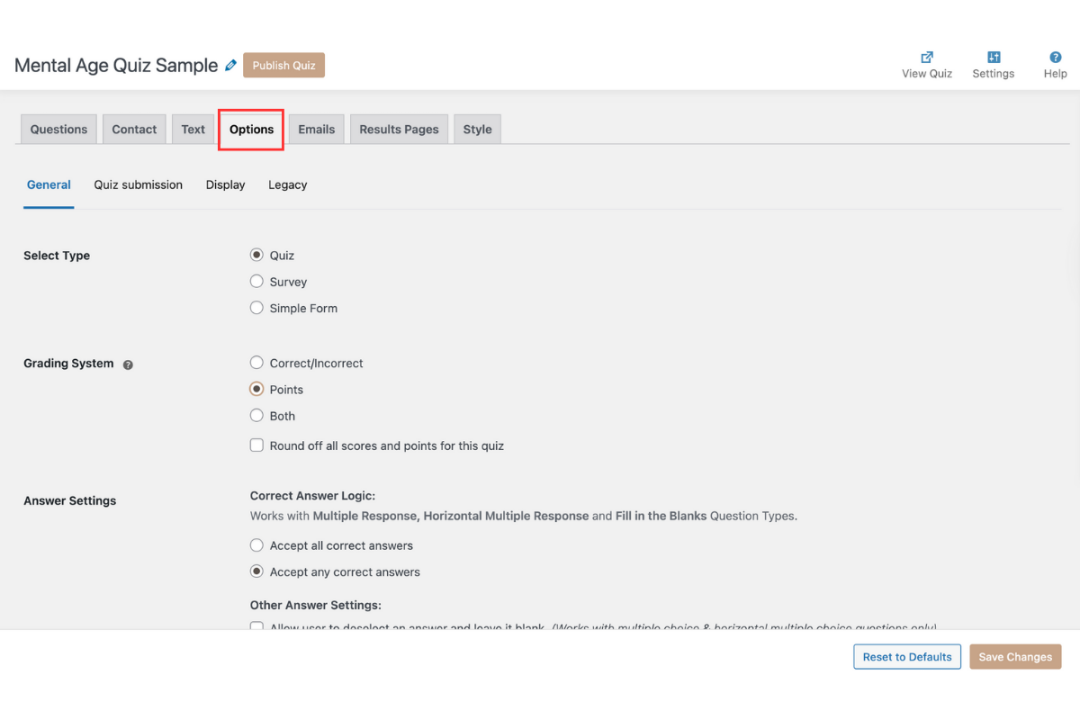
For a mental age quiz, it helps to allow users to go back and change answers. This encourages honest responses instead of rushed ones. Use a points-based grading system, since the quiz is about patterns, not correct answers.
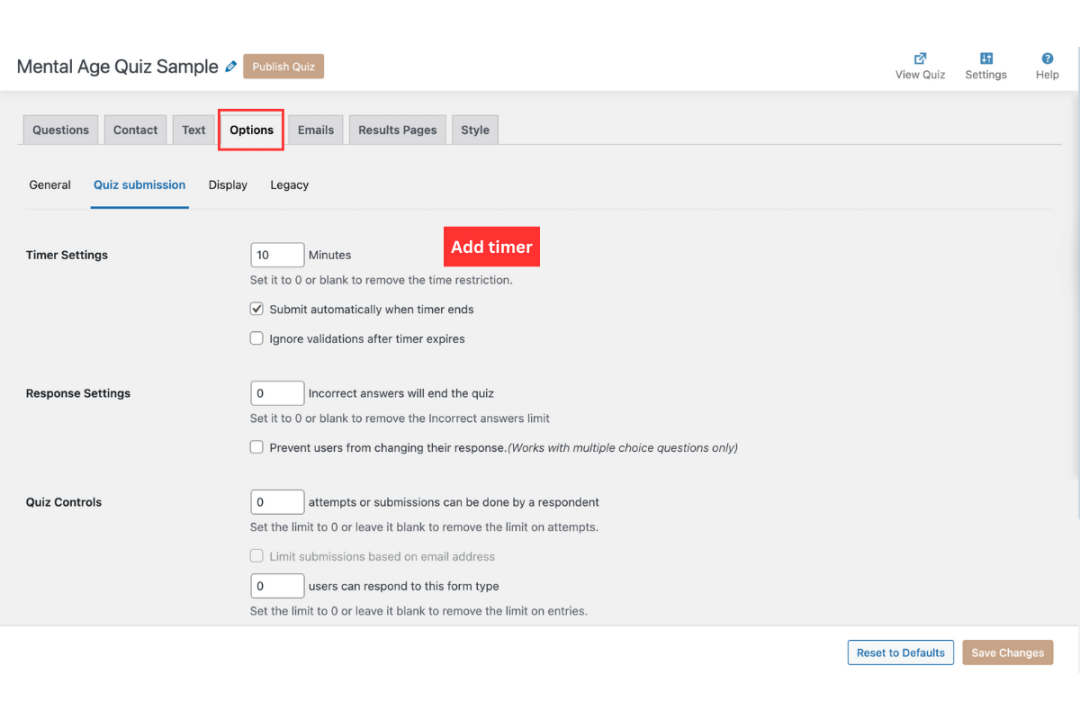
You can also enable a progress indicator so users know how much of the quiz is left. Small changes here improve completion and make the quiz feel relaxed rather than exam-like.
Step 5: Create the Results Page and Emails
This is where everything comes together. Open the Results Pages tab and create score-based rules.
Define clear score ranges and link each range to a mental age group. For example, a lower score can show a younger mental age with an explanation about curiosity and flexibility. A middle range can describe balance, while a higher range can reflect structure and long-term thinking.
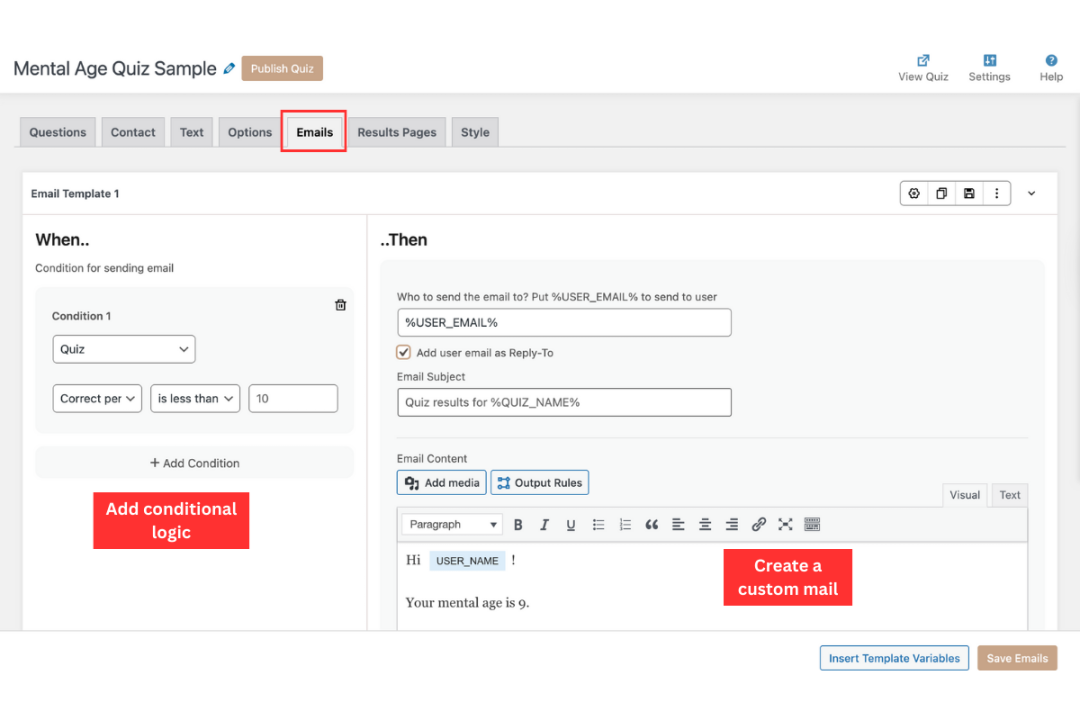
Each result should explain why the user got that mental age, not just show a number. This supports the blog’s promise of helping users understand how mental age is calculated.
If you collect emails, you can also send the same explanation by email. Keep it short and clear so users can revisit their results later. Learn how to embed a quiz in a post
Your Mental Age Quiz Could Be Live This Week! You have just seen every step it takes. QSM handles the questions, scoring, results, and lead capture, all inside your WordPress dashboard. No code. No developer. Free to start.
Tips for Writing Better Mental Age Quiz Questions
- Keep them short and clear: Questions should be easy to read and understand. Long or complicated sentences can confuse participants and reduce their interest. A simple question like “Do you enjoy learning new things?” works better than a detailed one.
- Avoid tricky or repetitive wording: Do not use double negatives or wording that can be interpreted in more than one way. Tricky questions frustrate participants and affect the accuracy of your quiz results. Keep the language direct.
- Use a balance of fun and serious questions: A mental age quiz should feel light but meaningful. Fun questions keep people entertained, while thoughtful ones encourage self-reflection. For example, combine lighthearted questions like “Would you rather watch cartoons than a documentary?” with deeper ones like “Do you find it easy to manage responsibilities?”
- Make them relatable across different age groups: Your audience might include teenagers, young adults, and older participants. Write questions that everyone can connect to. Avoid cultural or generational references that only a small group of people would understand.
Benefits of Using QSM as Your Mental Age Quiz Maker
To create a professional-looking mental age quiz, you need the right tool. The Quiz and Survey Master (QSM) plugin is one of the best mental age quiz makers for WordPress because it offers powerful features without making the process complicated.
1. Unlimited Free Quizzes and Surveys
QSM lets you create as many quizzes and surveys as you want without any cost. This makes it perfect for bloggers, educators, and business owners who want to add interactive content to their websites.
2. Custom Themes and Styling Options
A quiz should look good as well as work smoothly. QSM offers customizable themes and styling options so you can match the quiz design to your website branding. This helps create a seamless user experience.
3. Add-ons for Analytics, Google Sheets, and Dashboards
With QSM, you can do more than just create a quiz. These powerful add-ons allow you to track results, connect responses directly to Google Sheets, and build dashboards for deeper insights. This makes your quiz more useful for both engagement and data collection.
4. Ability to Create True or False Quizzes, Personality Tests, and More
QSM is versatile. You can build a simple true or false quiz, a detailed personality test, or even a custom survey. This flexibility means you are not limited to just one quiz type and can experiment with different formats to engage your audience.
Ready to Launch Your Mental Age Quiz?
Two ways to get there — pick the one that fits how you work.
DONE FOR YOU
Get Your Quiz Built End-to-End
If your quiz needs to work inside a real funnel, connected to your email platform, or product flow, JustHyre builds it so it performs from day one. You hand over your goals and brand details. JustHyre team handles the questions, scoring logic, design, results copy, and every integration. No trial and error, you only get a ready-to-publish quiz.
DO IT YOURSELF
Build It Free Inside WordPress
You already know how to build a mental age quiz with QSM; you just went through every step. Now it’s time to make it yours. Customize the questions, set your own scoring ranges, design the results, and publish them directly inside your WordPress dashboard. No code, no developer, and free to start. Full control from the first question to the final result page.
FAQs
How can I calculate my mental age?
You can calculate your mental age using the mental age quiz. Such quizzes are created to analyze a person’s mental age in response to the questions designed to analyze it.
What is a normal mental age?
A normal mental age does not have a fixed number. Mental age varies from person to person and depends on thinking style, habits, and behavior, not on actual age.
Can I create a mental age test for free in WordPress?
Yes. You can create a mental age quiz for free using the Quiz and Survey Master (QSM) plugin. The free version supports multiple question types, scoring, and result pages.
Do I need coding skills to create a mental age quiz?
No coding is required. QSM lets you create, edit, and publish quizzes using a simple dashboard inside WordPress.