Someone just finished your quiz, scored high on every buying signal, and left their email. Then the result sits on the QSM Results screen until somebody remembers to look. By the time you reply, they have booked a call with someone else.
The fix is to push every submission somewhere the moment it happens: a spreadsheet, your CRM, a Slack channel, an email sequence. Zapier will do it, but Zapier bills per task, so a quiz that goes viral gets expensive fast. n8n does the same job, it is open source, and when you host it yourself there is no per-run fee at all.
I built this end to end on a fresh WordPress site with QSM 11.3.2 and n8n 2.48: a three-question lead quiz, a webhook into n8n, a score check that splits hot leads from the rest, and a table that fills itself. Every screenshot below is from that run.
The short version
Add a Webhook node in n8n, then get QSM to POST each result to its URL. There are two ways to do the second part: the paid QSM Webhooks add-on (no code, point and click) or a free 30-line snippet that hooks into qsm_quiz_submitted. Both need n8n running on a public HTTPS address, not on your laptop.
Two ways to send QSM results to n8n
| QSM Webhooks add-on | Free snippet (this guide) | |
|---|---|---|
| Cost | $59 for one site, with a year of updates | Free |
| Code | None | One PHP file you paste once |
| Payload formats | JSON, Array, Form Data, XML | JSON (you choose the fields) |
| Per-quiz or per-result rules | Yes, assigned on the Results Pages tab | Yes, with an if on the quiz ID |
| Delivery log | Built in, with status codes | n8n’s Executions list only |
| Best for | Non-developers, several quizzes, several destinations | Developers who want the payload exactly their way |
The n8n side is identical either way, so pick the QSM side that suits you and follow along.
What we are building
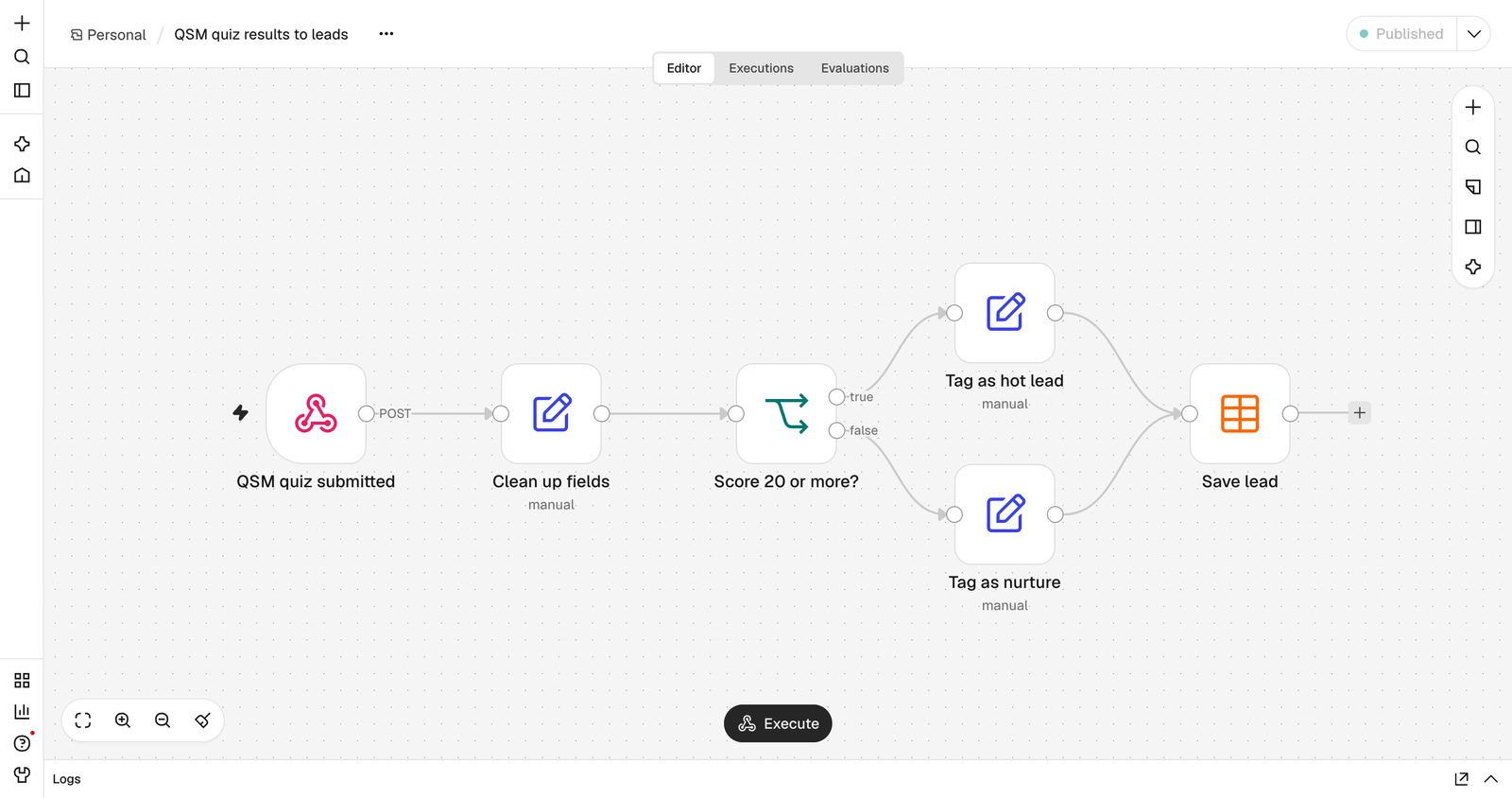
Here is the finished workflow. A quiz submission lands on the webhook, the fields get cleaned up, an IF node checks the score, and the lead is saved with a hot or nurture tag.
Step 1: Build a quiz that scores intent
For lead routing you want a points quiz, not a right-or-wrong one. I used three questions, each answer worth 1, 5 or 10 points, so the maximum is 30:
- How many people will use the tool? Just me (1), 2 to 10 (5), More than 10 (10)
- When do you want to get started? Just looking (1), This quarter (5), This month (10)
- What is your monthly budget? Under $50 (1), $50 to $500 (5), Over $500 (10)
Set the grading system to Points and turn on the Name and Email contact fields, so every result arrives with someone to follow up with. If you are new to this, our guide to building a quiz funnel covers the question design in more depth.
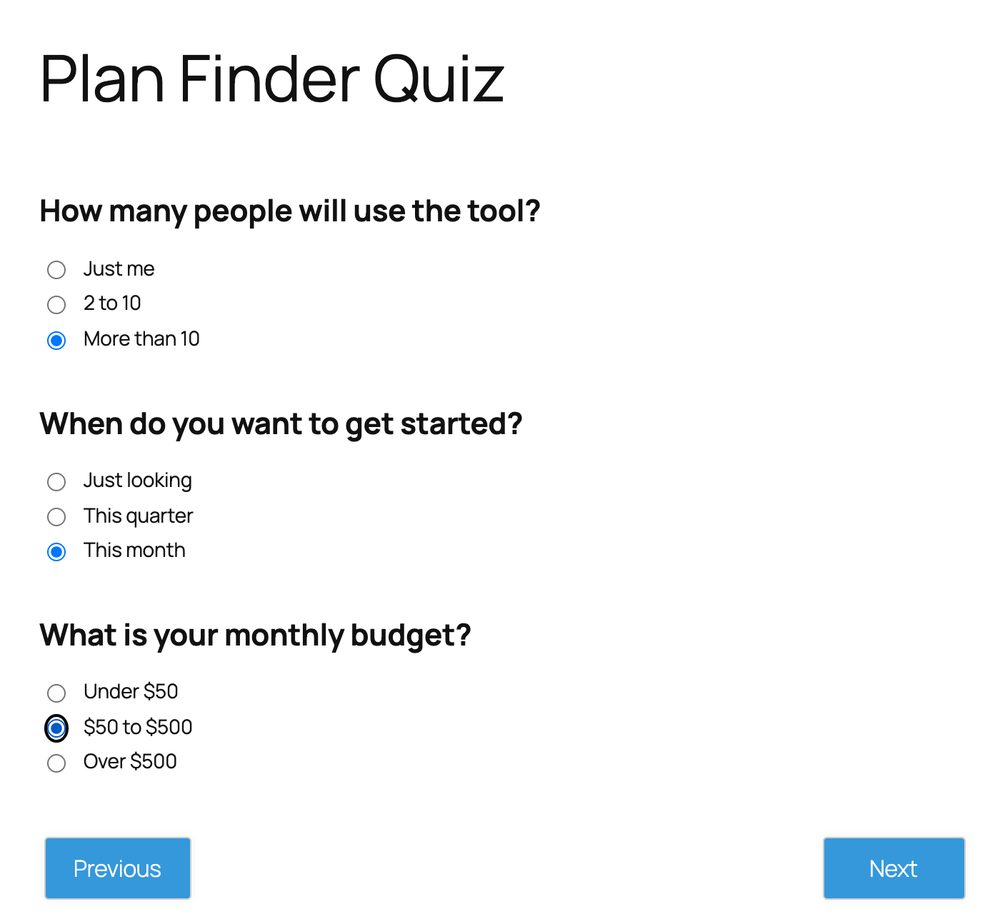
Two settings caught me out. First, turn off instant right/wrong feedback in the quiz options. If it is on, a points quiz shows “Wrong! You have selected wrong answer.” under every pick, which is a strange thing to tell a prospect who just said their budget is $500. Second, make sure the quiz is published: QSM renders a draft quiz but does not save its responses.
Step 2: Create the Webhook node in n8n
In n8n, start a new workflow and add a Webhook node:
- HTTP Method: POST
- Path: something readable, like
qsm-quiz - Authentication: Header Auth. Create a credential with the header name
X-QSM-Secretand a long random value. Without this, anyone who finds the URL can stuff fake leads into your CRM. - Respond: Immediately
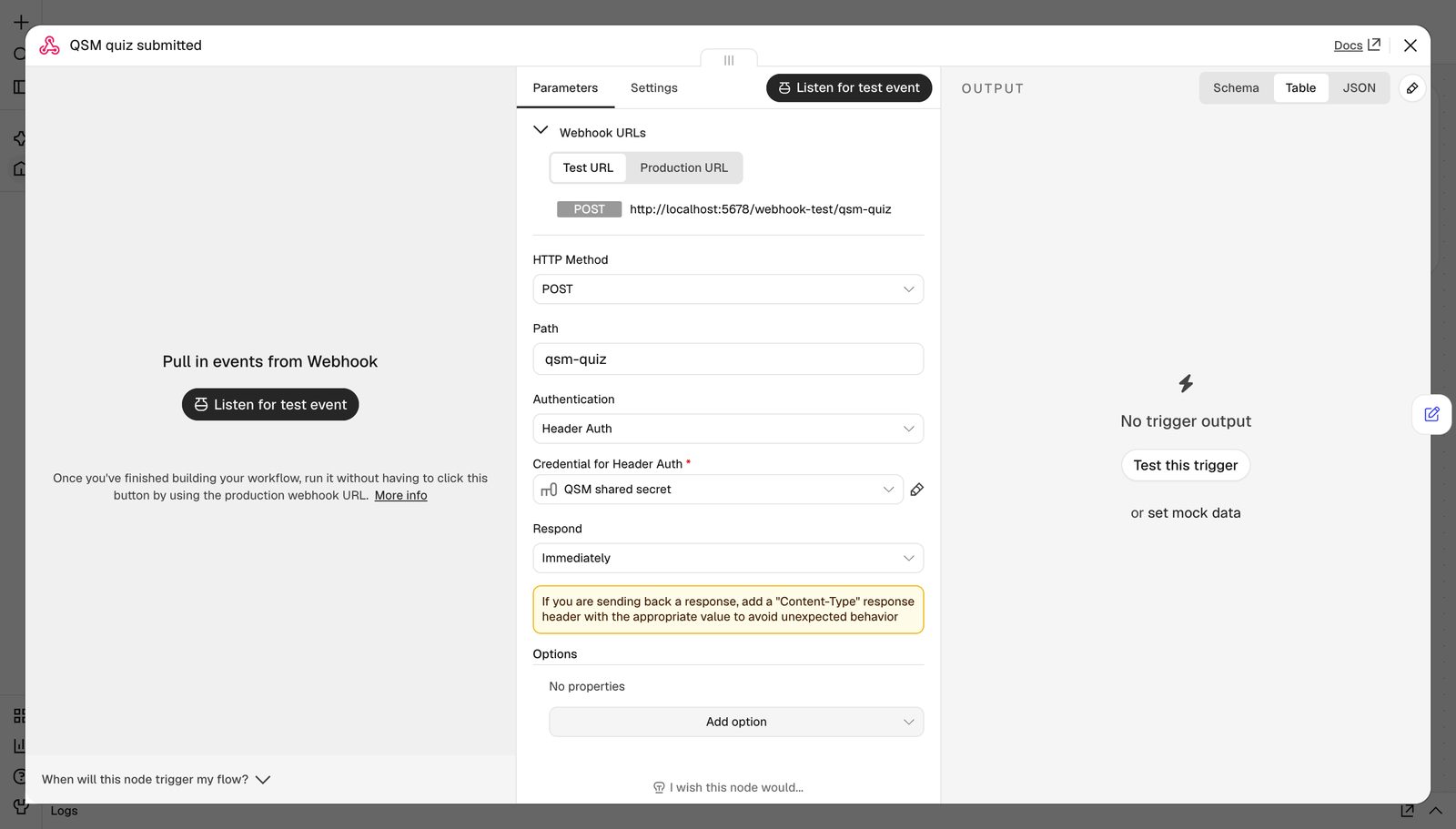
The node gives you two URLs. The Test URL only listens while you click “Listen for test event”, which is handy while building. The Production URL works all the time, but only once the workflow is published. Put the Production URL in QSM, or you will wonder why nothing arrives the next morning.
Step 3, option A: Send results with the free snippet
QSM fires a WordPress action called qsm_quiz_submitted every time a quiz is submitted, and passes along the answers, the result ID and the scores. That is everything we need. Save this as wp-content/mu-plugins/qsm-to-n8n.php (create the mu-plugins folder if it does not exist; files there load automatically and cannot be switched off by accident):
<?php
/**
 * Plugin Name: QSM to n8n
 * Description: Sends every QSM quiz submission to an n8n Webhook node as JSON.
 */

// Your n8n Webhook node's Production URL and the secret you set in its Header Auth credential.
const QSM_N8N_WEBHOOK_URL = 'https://n8n.example.com/webhook/qsm-quiz';
const QSM_N8N_SECRET      = 'change-me-to-a-long-random-string';

add_action( 'qsm_quiz_submitted', function ( $results_array, $results_id, $quiz_options, $data ) {
	$answers = array();
	foreach ( (array) ( $results_array[1] ?? array() ) as $q ) {
		$answers[] = array(
			'question' => $q['question_title'] ?? '',
			'answer'   => $q[1] ?? '',
			'points'   => $q['points'] ?? 0,
		);
	}

	$contact = array();
	foreach ( (array) ( $data['contact'] ?? array() ) as $field ) {
		$key             = ! empty( $field['use'] ) ? $field['use'] : sanitize_key( $field['label'] );
		$contact[ $key ] = $field['value'];
	}

	$payload = array(
		'quiz_id'      => (int) $data['quiz_id'],
		'quiz_name'    => $data['quiz_name'],
		'result_id'    => (int) $results_id,
		'points'       => (float) ( $data['total_points'] ?? 0 ),
		'max_points'   => (float) ( $data['total_possible_points'] ?? 0 ),
		'score_pct'    => (float) ( $data['total_score'] ?? 0 ),
		'contact'      => $contact,
		'answers'      => $answers,
		'submitted_at' => gmdate( 'c' ),
	);

	wp_remote_post( QSM_N8N_WEBHOOK_URL, array(
		'headers'  => array(
			'Content-Type' => 'application/json',
			'X-QSM-Secret' => QSM_N8N_SECRET,
		),
		'body'     => wp_json_encode( $payload ),
		'timeout'  => 5,
		'blocking' => false, // don't make the quiz taker wait on n8n
	) );
}, 10, 4 );
Why it looks like this:
- It reshapes the data. QSM’s internal arrays use numeric keys (the chosen answer lives at index
1of each question row). Flattening them intoquestion,answerandpointsmeans your n8n expressions read like English. - Contact fields are keyed by their role, so you get
contact.nameandcontact.emailno matter what you labelled them. 'blocking' => falsesends the request without waiting for a reply, so the results page loads just as fast as before. The trade-off: if n8n is down, WordPress will not tell you. QSM still saves the result as normal, so nothing is lost, and you can see every delivery that did land in n8n’s Executions list.- If you only want one quiz, add
if ( 1 !== (int) $data['quiz_id'] ) return;as the first line inside the function.
Step 3, option B: Use the QSM Webhooks add-on
If you would rather not touch PHP, the QSM Webhooks add-on does the same job from the dashboard. You can already see where it plugs in on the free plugin: open your quiz, go to Results Pages, and there is an Assign Webhook box under the result page editor.
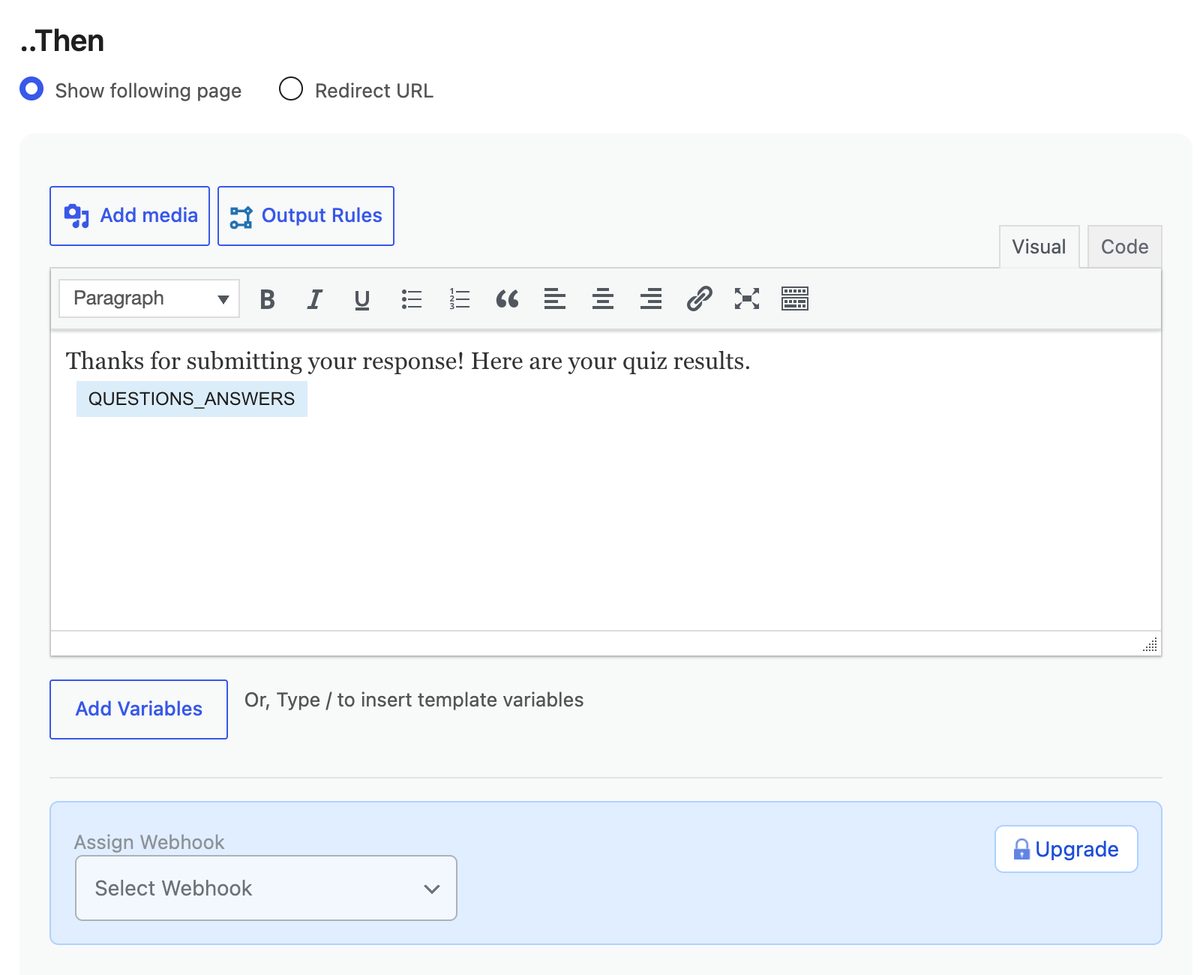
With the add-on active you get a Webhooks screen under QSM where you:
- Click Add New, name the webhook, and paste the n8n Production URL.
- Choose POST and JSON (GET only supports Form Data).
- Build the payload from QSM’s template fields. Nested objects are supported, so you can group contact details the same way the snippet does.
- Add an HTTP header
X-QSM-Secretwith the same value as your n8n credential. - Assign the webhook to a result page. Because result pages have conditions, you can send only certain outcomes, for example only scores above a threshold.
It also keeps a delivery log with response codes, which is the main thing the snippet does not give you. A single-site license is $59 and includes a year of updates (current pricing), or it comes in the add-on bundles.
Step 4: Take the quiz and check what n8n received
Publish the workflow, take your own quiz, and open the Executions tab. Here is what came through when “Dana” picked More than 10, This month and $50 to $500:
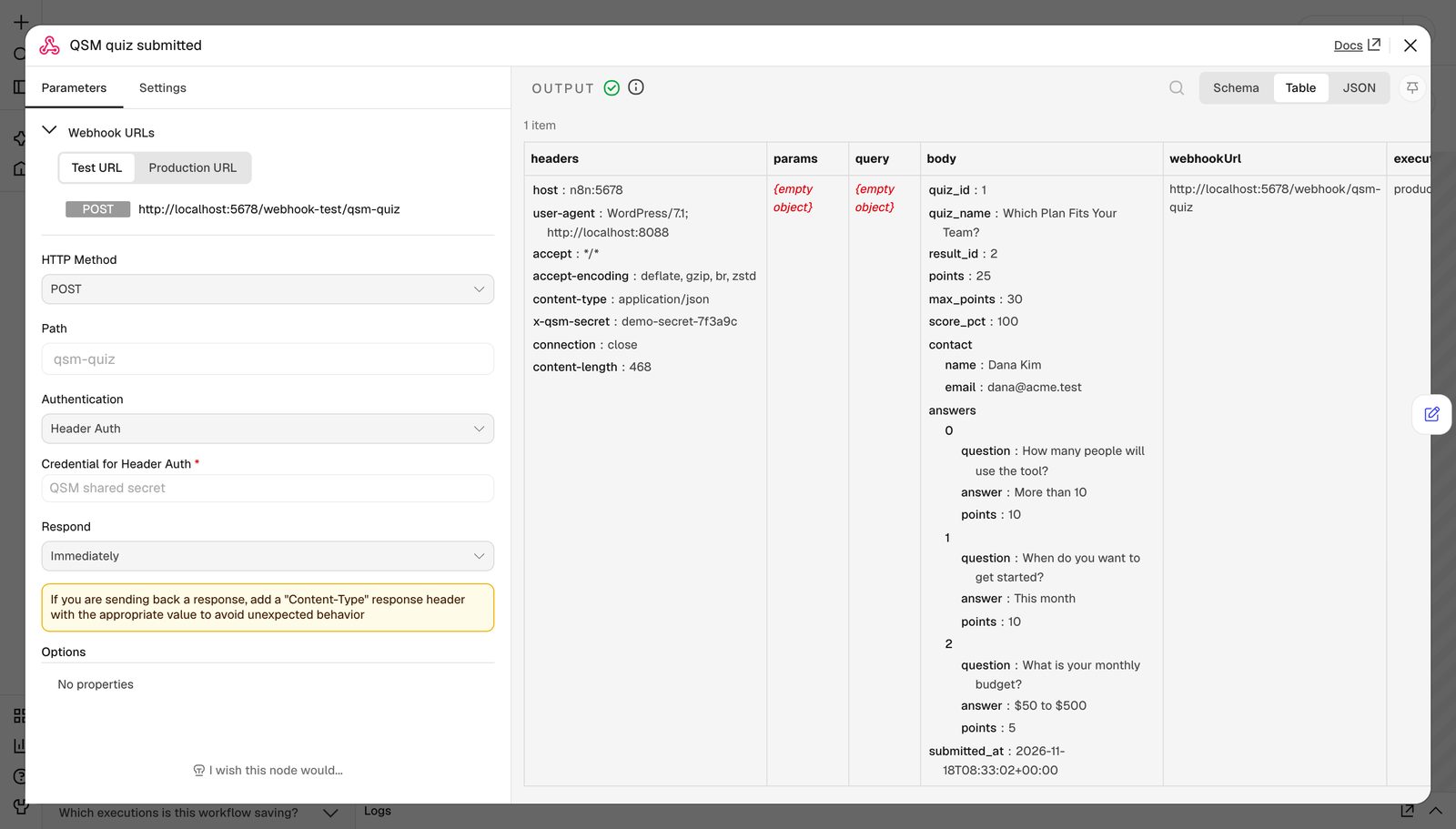
The body is the JSON from the snippet, which means the fields you will use most are:
{{ $json.body.contact.email }}{{ $json.body.contact.name }}{{ $json.body.points }}(25 here) and{{ $json.body.max_points }}(30){{ $json.body.answers }}, the full list of questions and picks
Step 5: Score the lead and send it somewhere useful
The rest of the workflow is four small nodes:
- Edit Fields (Set) named “Clean up fields”: map
name,email,quizandscorefrom the expressions above, so later nodes do not have to dig intobody. - IF named “Score 20 or more?”: Number,
{{ $json.score }}is greater than or equal to 20. - Two more Edit Fields nodes that add
segment = hoton the true branch andsegment = nurtureon the false branch. - A destination. For this demo I used n8n’s built-in Data table node so it runs without connecting any outside accounts.
After three test runs the table looked like this: two hot leads and one for the newsletter, and nobody copied anything by hand.

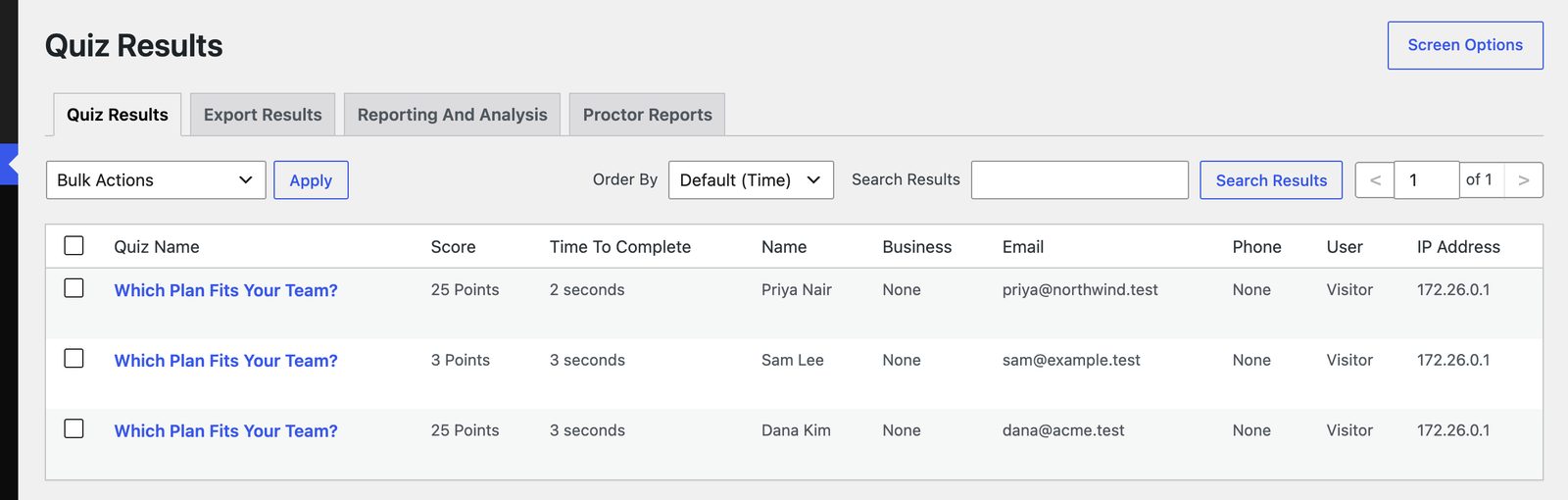
QSM still stores every result on its own Results screen as usual, so you have the original record in WordPress too:
In a real setup, swap the Data table for whatever you already use. I did not connect these accounts for the demo, but they are standard n8n nodes that take the same fields:
- Hot branch: a Slack message to your sales channel, plus a HubSpot or Pipedrive contact with the score as a property.
- Nurture branch: add them to a Mailchimp or Brevo list for a slower sequence.
- Both: append a row to Google Sheets so the whole team can see every response.
If you are using the quiz to grow a list, pair this with a quiz lead magnet: the webhook is what turns that list into same-day follow-ups instead of a weekly export.
Where n8n has to run
QSM sends the webhook from your WordPress server, so the n8n URL has to be reachable from the public internet over HTTPS. An n8n on your laptop at localhost:5678 will work while you test against a local WordPress, then receive nothing once the quiz is live.
You have three realistic options:
- n8n Cloud. Zero setup, but plans are priced by executions, which is exactly the meter you were trying to get away from.
- A VPS you manage. Cheapest on paper. You provision the server, install Node, configure nginx as a reverse proxy, get SSL working, set up a process manager, open the firewall and point a domain at it. If the webhook URL n8n shows you still says
localhostafter all that, here is how to fix the n8n webhook URL behind a proxy. - A managed one-click n8n. I run mine on InstaPods: n8n is ready in about a minute on a real Linux server with HTTPS and a custom domain already done, and the $7/mo Build plan (2 vCPU, 2 GB RAM) has no execution cap, so a quiz that takes off costs the same as one that does not. New accounts get $10 in credit when they add a card, which covers the first month with change.
If you want to compare before you pick, here is a breakdown of the cheapest ways to host n8n, from managed apps to a bare VPS, with real prices.
Troubleshooting
| What you see | What it means |
|---|---|
The requested webhook "POST qsm-quiz" is not registered. (404) |
The workflow is not published, or you pasted the Test URL. Publish it and use the Production URL. |
Authorization data is wrong! (403) |
The X-QSM-Secret value in WordPress does not match the n8n credential. Copy it again, watching for trailing spaces. |
| Nothing in Executions at all | n8n is not reachable from your web server. Run curl -X POST against the Production URL from the server itself. If that fails, it is DNS, SSL or a firewall, not QSM. |
| Execution runs but name and email are empty | The contact fields are not enabled on the quiz’s Contact tab, or your expressions skip body. It is $json.body.contact.email, not $json.contact.email. |
FAQ
Do I need the QSM Webhooks add-on to connect QSM to n8n?
No. The free plugin fires the qsm_quiz_submitted action on every submission, and the snippet above turns that into a webhook. The add-on is the no-code route, with a delivery log and per-result-page conditions built in.
Will sending a webhook slow down my quiz?
Not with the snippet as written. 'blocking' => false fires the request and moves on, so the quiz taker sees their results page at the same speed as before.
Is n8n really free?
The self-hosted version is free to use for your own workflows, with no limit on executions. You pay for whatever runs it: a server you manage or a managed host. n8n’s own Cloud plans are paid and priced by executions.
Can I send only some quizzes to n8n?
Yes. With the snippet, return early unless $data['quiz_id'] matches the quiz you want. With the add-on, assign the webhook only on that quiz’s results page.
Once a few leads come through, our ideas for a WordPress quiz that boosts leads will help you get more of them.