2025 was about building better, refining QSM based on how real users create, manage, and scale quizzes, surveys, and assessments every day.
From major feature launches, thoughtful updates, to behind-the-scenes usability improvements, this year was driven by one core principle: listen carefully, create responsibly, and improve continuously.
This post is a look back at what we built in 2025, why it mattered, and a brief look at where we’re heading next.
2025 at a Glance
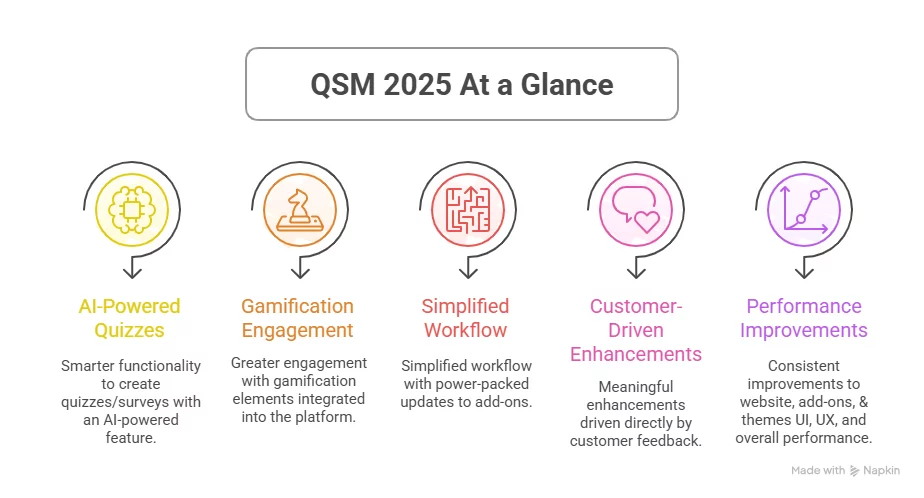
This year’s progress can be summed up in a few key points:
- Smarter functionality to create quizzes/surveys with an AI-powered feature
- Greater engagement with gamification
- Simplified workflow with power-packed updates
- Meaningful enhancements driven directly by customer feedback
- Consistent improvements to UI, UX, and overall performance
Each release, big or small, was aimed at making QSM easier, faster, more efficient, and flexible.
Major Features Released in 2025
AI Integration
2025 marked a major step forward with AI integration in QSM, designed to reduce manual effort and help users work smarter, not harder.
With the global advancement of using AI in day-to-day workflows, it was time that we did the same for our users.
This feature opened up new possibilities for users to create quizzes and surveys with a prompt, while keeping full control in the hands of users.
The focus was simple: save time, improve efficiency, and support better quiz and survey questions — without overcomplicating workflows.
Gamify Add-On: Coins
Engagement has always been central to effective quizzes and assessments.
As we continued building the Gamify Add-On, it became clear that engagement needed a more tangible layer, one that could help quiz creators motivate participation and reward progress in a structured way.
The Coins feature was introduced as part of that thinking. It provides a simple and consistent reward mechanism that creators can use to encourage participation and reinforce progress throughout a quiz or exam.
Ultimate Add-on
As QSM evolved, we saw a clear need among users for features that address more advanced but specific quiz and survey requirements and add greater depth to how experiences are built.
The Ultimate Add-on was created to serve that purpose. It provides a defined set of features designed to extend what users can do when creating quizzes and surveys, offering advanced capabilities through a single, well-structured add-on.
This gives users another way to work with QSM, depending on how they prefer to build and scale their projects.
Certificate Add-on
One of the most significant upgrades this year was Certificate Add-on v2.0, focused entirely on speed, clarity, and better management.
- Ready-to-use templates reduced setup time
- Live previews removed guesswork before publishing
- Custom validity messages made certificate verification clearer for learners.
- A redesigned certificate list page with pagination and filters,
- The ability to delete certificates easily made ongoing management far more practical.
The outcome is a certificate workflow that feels lighter and more flexible.
Features Shaped by Customer Feedback
Many improvements and upgrades didn’t start with a roadmap, but from feedback, suggestions, and conversations. Support tickets and feature requests helped us understand where the friction existed. These updates are a direct result of the feedback we received.
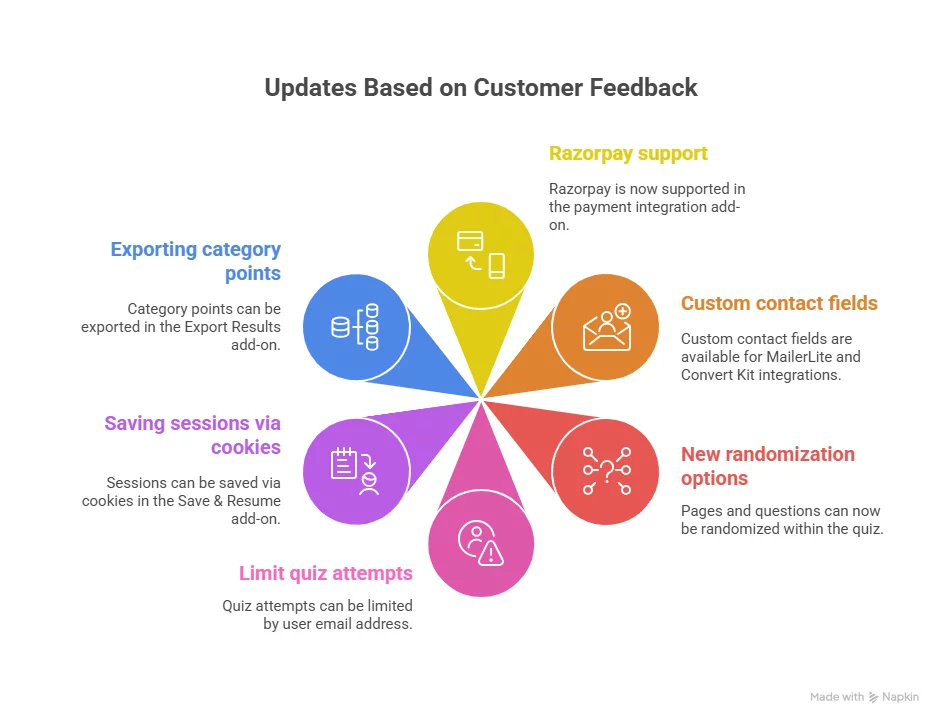
- Indian payment support – Customers in India told us that payment setup was a blocker. Adding Razorpay support in the Payment Integration add-on made it easier to accept payments without workarounds.
- More meaningful data segmentation into email tools – Users wanted deeper personalization beyond basic fields. By adding custom contact fields to MailerLite and ConvertKit integrations, supporting better segmentation and follow-ups.
- Randomization without breaking structure – Users needed the flexibility to randomize pages. The new randomization options now allow pages to be randomized while keeping questions intact, as well as randomize questions within each page.
- Better control over quiz attempts – For users running assessments or lead-based quizzes, unlimited retries created noise. The option to limit quiz attempts by user email added a simple but effective layer of control.
- Smoother Save & Resume for non-logged-in users – For some customers, using session IDs was confusing, and they often lost their progress. Saving sessions via cookies now allows quizzes to resume automatically for non-logged-in users, removing friction without changing the system.
- Useful exports – For users analyzing results externally, missing data meant extra work. Exporting category points made it easier and reduced manual calculations.
These are some of the upgrades that solved a narrow problem, but collectively made QSM more reliable and adaptable for different real cases.
To check whole major updates, enhancements, fixes, and more, you can check out our QSM updates page 👇
UI, UX & Workflow Improvements
Not every improvement is visible at first glance, but many are felt immediately. Throughout 2025, we focused on reducing friction across everyday workflows, especially in areas where users interact repeatedly.
1. Cleaner, faster question management – improvements to the question bank pop-up, enhanced search, and better organization made finding and managing questions less disruptive.
2. Better reliability on server-side – Server-side validation for contact form fields reduced errors and uncertainty.
3. Consistent UI improvements across core areas – Refinements across Quiz, Text, Option, Email, Result, and Dashboard pages improved clarity and reduced visual noise.
4. Better support for global audiences – Multi-language support for quiz redirect URLs.
5. More flexible theme customization – Updated all QSM themes, and added customization of default settings provide users greater control.
Individually, these were small changes we made on the backend, but collectively, they improved the overall structure and stability of QSM.
Thank You to the QSM Community
None of this progress would be possible without our users. Whether you:
- Shared feedback
- Reported issues
- Suggested improvements
- Or simply used QSM in creative ways
You played a role in shaping what QSM is today. We genuinely appreciate the time and trust you place in us.
Looking Forward to 2026
While we’re keeping details under wraps, 2026 will continue to focus on:
- Smarter workflows
- More AI-adaptability features
- Greater customization and control
- Performance and usability improvements
- And features that scale with evolving use cases
The goal is the same: to make QSM more powerful without complicating it.
2025 was a year of steady, meaningful progress. Moving forward, 2026 will build on that foundation of constant guidance, guided by your feedback, suggestions, grounded in our expertise & experience, and focused on providing long-term value.
As always, we’re listening. And we’re just getting started.
💡If you’re using QSM and have some ideas up your sleeve, we would be happy to know your feedback.