The Advanced Timer add-on gives you solid control over how the timer works in your quizzes. You can set a duration, count up or down, show warnings, and let the timer continue across pages, and it covers a lot.
But one thing was always missing: a way to reward quiz takers based on time.
That changes with the new update we’ve brought to the Advanced Timer. It comes with Time-Based Points Rules, and it’s one of those features that sounds simple but opens up a different opportunity to reward your quiz takers.
What Are Time-Based Points Rules?
At its core, it’s a points multiplier system. You set the quiz time duration as usual, and then on top of that, you define rules that reward quiz takers with bonus points based on how quickly they finish.
If someone completes the quiz within your defined thresholds, their points get multiplied. And for everyone who doesn’t hit any of the thresholds, a default points value makes sure they still walk away with something for completing the quiz.
It’s straightforward, but it adds a whole new layer of motivation that timed quizzes alone don’t provide.
How It Works
Let’s say you’ve built a 3-minute quiz.
You set up two rules:
- Finish within 60 seconds, and your points are multiplied by 3x
- Finish within 40 seconds, and your points are multiplied by 4x
You also set a default points value for anyone who finishes after 60 seconds.
On a 50-point quiz, here’s how it plays out for three different quiz takers:
| Quiz Taker | Finish Time | Points Earned | Rule Applied | Total Points |
| Alex | 38 seconds | 40 points | 4x multiplier | 160 points |
| Jamie | 55 seconds | 35 points | 3x multiplier | 105 points |
| Sam | 1 minute 10 seconds | 50 points | Default 1x | 50 points |
Alex finishes fastest and scores 40 out of 50, which, with the 4x multiplier, becomes 160 points. Jamie scores 35 and hits the 3x threshold, walking away with 105. Sam takes the longest but actually scores a perfect 50, and with the default 1x multiplier, that’s exactly what they keep.
Same quiz, three very different outcomes. That’s what makes the feature interesting.
You can add as many rules as you need, each with its own time threshold and multiplier. There’s no limit on how granular you go.
Below is the demo to show you how this new feature works
Setting It Up
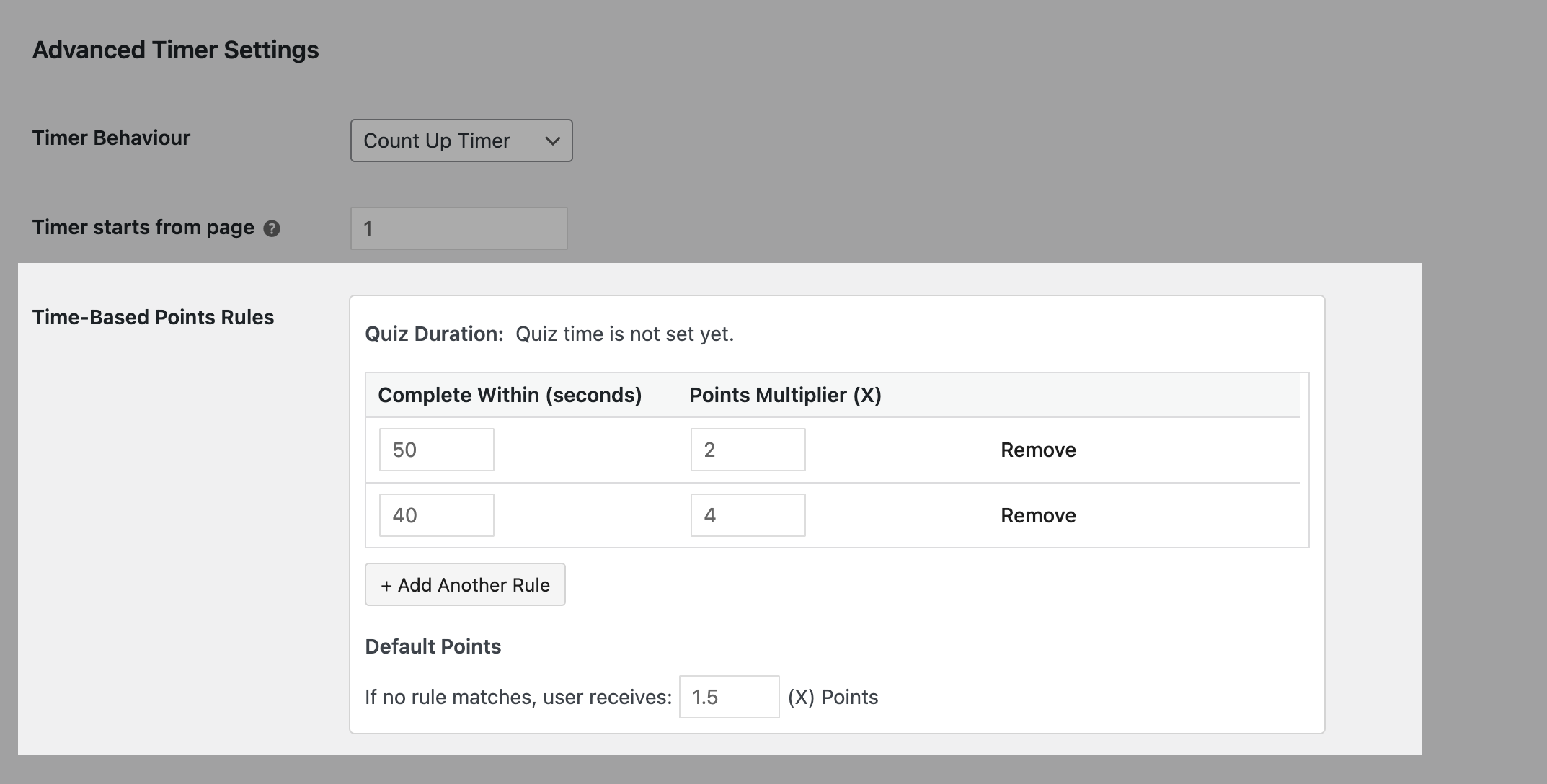
Once Advanced Timer is active on your quiz, you’ll find Time-Based Points Rules in the Advanced Timer settings. The three things you’ll configure for each rule are
Complete within (seconds) — the time threshold a quiz taker needs to finish under to qualify for this rule
Points awarded (X) — the multiplier applied to their score if they hit this threshold
Default points — the points value given to anyone who doesn’t qualify for any of the rules you’ve set
That’s it. Set the threshold and multiplier, add another rule if you need one, and set your default. The add-on handles the rest.
👉 To set up Advanced Timer properly with all the features for your quiz or assessment, refer to our Advanced Timer documentation.
How to Set Your Rules With Intent
Setting up the time-based rules is simple, but getting them right takes intent. So here are some points to think about before you set the time-based rules for your quizzes.
- Keep it realistic
Don’t set targets that are too hard to reach. If, on average, for a 3-minute quiz, most quiz takers take a minimum of 60 seconds to finish, then don’t expect them to finish in 20. Keep it challenging, but fair. - Don’t overcomplicate
For simple or fun quizzes, keeping a max of 2 rules is enough. For competitive quizzes, you can add more rules to better rank users. - Make default points feel fair
Even if someone doesn’t meet any rule, they should still feel like they earned something, not like they failed. So add a default points reward worth your users’ effort.
Use Cases
1. Corporate Training Programs – Employees completing compliance or skills training often have low motivation to finish quickly. Time-based multipliers add a light competitive element that encourages engagement without turning it into a stressful experience.
2. Classroom Assessments – Teachers can reward students who demonstrate confident knowledge by finishing faster, while still giving full credit to students who take their time and answer correctly.
3. Competitive Quiz Events – For leaderboard-style quiz competitions, time-based points add a meaningful differentiator. Two participants with the same score can be separated by how quickly they finished, which makes rankings feel fairer and more dynamic.
4. Gamified Learning Platforms – If you’re building a gamified learning experience with levels, badges, or streaks, time-based multipliers fit naturally into that system. They give learners another variable to optimize for beyond just getting answers right.
Why This Matters
The extra dimension is genuinely useful. It helps training managers identify who has truly mastered the material vs. who got lucky. It helps educators spot confident learners. And it gives competitive quiz formats a more nuanced scoring system that participants actually find exciting.
Want to explore more of what’s new in QSM 11? Head back to the QSM 11 release overview for the full picture.